Roles and permissions
The catalog of capabilities a role can hold, the object grant, and how to restrict access without editing a built-in role.
A role is a named set of grants. Every workspace starts with the built-in roles (owner, member, agent_default); anything narrower is a custom role, built from the same catalog. See Workspaces and API keys for the wire shape of a grant ({ scope, target, actions }) and the two scopes.
The catalog
Every system-scope grant targets one of the resources below. There is no catch-all resource and no way to grant something the catalog does not list: a target outside this list, or an action a resource does not define, is refused with 400 SCHEMA_PERMISSION_INVALID_GRANT.
Capabilities are grouped for display; each capability defines one or more levels, cumulative low to high, and the resource(s) that level's actions apply to. Granting a level grants every action of every level below it.
| Group | Capability | Resource(s) | Levels (low → high) | member default |
|---|---|---|---|---|
| Data | forms | forms | fill (read) → edit (+create, update, delete) → manage (+manage) | fill |
| Structure | schema | architect | use (read) → edit (+create, update, delete) | use |
| Structure | pages | pages | read (read) → create (+create, update, delete) | create |
| AI | agents | agents | chat (read) → build (+create, update, delete) → manage (+manage) | chat |
| AI | environments | environments | use (read) → create (+create) | create |
| AI | browser-profiles | browser-profiles | use (create) | use |
| AI | private-secrets | private-secrets | use (create) | use |
| AI | routine-audiences | routine-audiences | use (create) | none |
| Files | files | files, documents | read → edit (+create, update) → full (+delete) | full |
| Team | people | people | view (read) → invite (+create) → manage (+update, delete) | view |
| Integrations | connectors | connectors | use (read, create, update, delete) | use |
| Integrations | api-keys | api-keys | view (read) → manage (+create, delete) | none |
| Integrations | env-vars | env-vars | view (read) → manage (+create, delete) | none |
| Administration | settings | settings | view (read) → manage (+update, delete, manage) | view |
| Administration | audit | audit | view (read) | view |
| Administration | billing | billing | view (read) | none |
The agents capability gates the routes agents use today (GET /ai/wallet's status, without the dollar amounts — those need billing:read too); billing itself gates GET /quotas and GET /ai/usage?scope=workspace (a caller's own usage, scope=me, needs no grant). people:read also gates GET /actors, the workspace directory, and GET /users/members (profiles plus each member's actor id and role ids, for the members screen); GET /actors/me, GET /actors/resolve and GET /actors/:id stay open to every authenticated actor for identity bootstrap and name resolution. A member's avatarUrl on these routes is their profile photo: an uploaded one is a signed URL valid for an hour, so read it fresh rather than storing it. PUT /permissions/actors/:actorId/roles (people:update) replaces an actor's roles in one call. POST /tenant-invitations (people:create) invites one email with one role (roleId); the person becomes a member only by accepting it. The email carries a single-use link to the acceptance screen; opening it never accepts anything: the invitee, signed in with the invited address, presses the join button, which calls POST /tenant-invitations/:id/accept. An invitation expires after 7 days; resending it issues a new link and invalidates the previous one, and revoking it makes every link dead. POST /tenant-invitations/:id/preview needs no grant and no session: the invitation's proof is the credential, it reads without changing anything, and any unusable invitation answers 404. agent_default is never a person's: PUT /permissions/actors/:actorId/roles and POST /tenant-invitations refuse it for a user with 400 SCHEMA_VALIDATION_FAILED, whatever the caller may grant. Inviting an email that already belongs to a member answers 409 SCHEMA_DUPLICATE_OBJECT.
browser-profiles:create adds a cloud browser profile and lists the Browsers settings section; every later change to a profile (rename, share, prepare, delete) is its owner's alone, whatever the role. On an instance without cloud browsers the capability gates nothing.
private-secrets:create adds a secret of your own under Settings → Execution → Secrets (My secrets), without any env-vars grant; listing and deleting your own secrets needs nothing more, and nobody else, the workspace owner included, can list, change or delete them. Workspace secrets stay under env-vars. Every tenant's member role was granted the capability once.
pages:read opens the workspace's shared pages and the private pages shared with you; pages:create adds private pages of your own and lets you edit and delete them. Shared pages and the workspace Home are edited under schema (architect). Every custom role that existed when pages arrived was granted pages:read once.
routine-audiences:create lets a routine's owner run it once per person it is shared with. Only owner holds it by default.
A member can hold several roles at once — grants union across them — and always keeps at least one: removing the last one is refused with 403 SCHEMA_WORKSPACE_INVARIANT. An invitation carries exactly one role.
A stored grant that matches no level of its capability (a custom combination, which only data written before the catalog could hold) is rounded down to the highest level it fully holds: settings: [read, update] becomes view, and a grant that holds not even the first level is removed. Every workspace's stored per-resource grants were rounded down this way once. The role editor does the same the next time the role is saved, so an edit anywhere in the role saves. Access above that level is removed, never widened. Only what is already stored is rounded down: a write that sends a combination matching no level, such as settings: [read, update], is still refused with 400 SCHEMA_PERMISSION_INVALID_GRANT. While files and documents hold different levels, the API refuses the role's permission writes with 400 SCHEMA_PERMISSION_INVALID_GRANT, so set one level on both first.
The object grant
object-scope grants are separate from the catalog: a role's access to business data is a grid of object name (or *) → level, plus one extra switch.
| Level | Actions |
|---|---|
read | read |
edit | + create, update |
full | + delete |
| purge | manage — outside the level ladder |
Purge is the role editor's Permanent deletion switch, or manage on object:* through the API. Purge is granted only on object:* (the wildcard), never on a single named object: it means "may permanently delete any record", not "may permanently delete this kind of record". member holds full on object:* and never purge — deleting for good stays with owner and any custom role built to hold it explicitly.
Creating and editing roles
Roles live in Settings → Roles & permissions. Creating one takes one gesture: New role opens a small popover — type the name, pick the role to start from (Member is preselected; No access starts empty) and press Enter. The role is created already named, with a copy of the base role's permissions, and opens with the cursor in its description. Escape or a click outside creates nothing. Duplicate, in a role's ⋯ menu, does the same with the name prefilled "Copy of …" and the base fixed. Built-in roles cannot be edited, only duplicated.
Every change on a role's page is saved as you make it — there is no Save button; a change the server refuses is undone, with a one-line message.
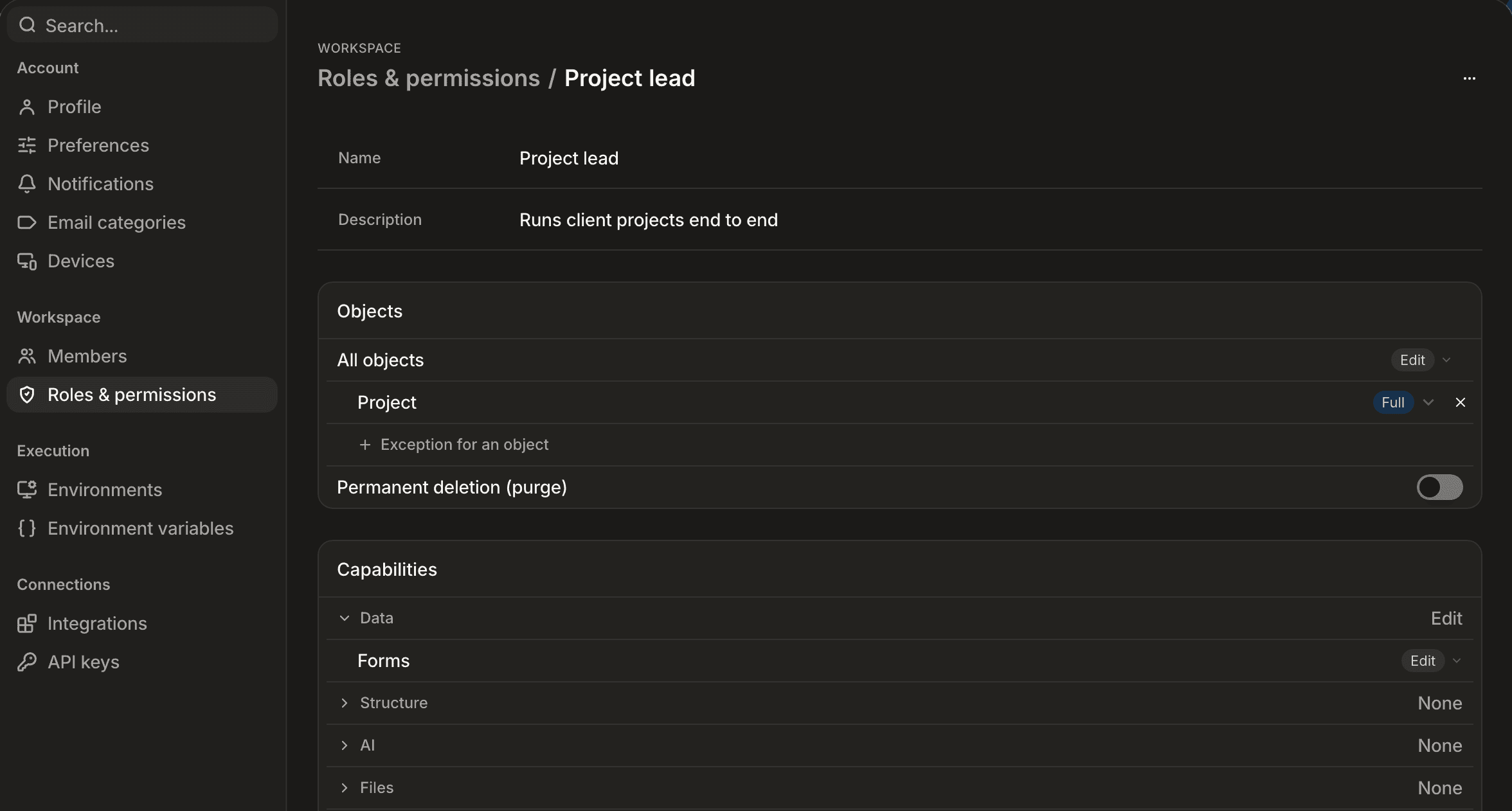
- Objects. "All objects" sets the default level on business data. An exception raises one object above it; exceptions never lower access. To hide an object, set "All objects" to None and raise the objects that stay visible. Raising the default removes the exceptions it now covers. Permanent deletion (purge) is a switch on all objects only.
- Capabilities. One level per capability, grouped as in the catalog above; a group's header shows the level its capabilities share, or "Mixed".
- A level above your own access is shown disabled: nobody grants what they do not hold. A role that already grants more than you hold is read-only for you.
- A role that is some member's only role cannot be deleted: reassign those members first.
Over the API, POST /permissions/roles takes { "label": "Sales", "description": "…", "from": "<role id>" }. from is optional: the new role gets a copy of that role's permissions (legacy rows nothing checks are left out, a system * is written out per capability) in one transaction, refused with 403 SCHEMA_FORBIDDEN — nothing is created — when the caller could not grant them, and with 404 SCHEMA_ROLE_NOT_FOUND when the base does not exist. A label another role of the workspace already uses, compared without case or surrounding spaces, answers 409 SCHEMA_DUPLICATE. name, the technical name, is optional and generated from the label when absent. Any other field is refused with 400 SCHEMA_VALIDATION_FAILED. PUT /permissions/roles/:id renames a role or changes its description, { "label": "…", "description": "…" }, both optional: the label follows the same rules (trimmed, not empty, 409 SCHEMA_DUPLICATE when another role already uses it), and any other field is refused with 400 SCHEMA_VALIDATION_FAILED.
Restricting someone
owner and member are immutable: they cannot be edited or deleted, and every tenant keeps them. To give someone less than member, build a custom role with only the capabilities and object levels it needs, and assign that instead of member. An actor's roles are assigned as one set, PUT /permissions/actors/:actorId/roles with { roleIds } (at least one id). A human always keeps at least one role — an empty set is refused with 400, and deleting a role that is some member's only role with 403 SCHEMA_WORKSPACE_INVARIANT.
Nobody changes their own access. Removing one of your own roles, changing your own status, deleting yourself or resetting your own access is refused with 403 SCHEMA_WORKSPACE_INVARIANT, whatever the permission you hold — another member does it. Owners are included. A personal API key counts as the member it belongs to. Adding a role to yourself stays allowed, within the grants you already hold.
Only an actor whose own permissions already cover everything a grant contains can hand that grant to someone else: every path that binds a grant to a role or an actor (editing a role's permissions, assigning or replacing a role, and invitations) checks this, and refuses with 403 when it does not hold.
Member names
A member's profile (GET /users/me, and each entry of GET /users/members) carries firstName, lastName and an optional preferredName — the name the member chose. When preferredName is set it is the name shown everywhere: the member's actor displayName, the greeting, the members list, mentions and initials. When it is absent, the name is first + last name, else the local part of the email address.
PUT /users/me takes preferredName for anyone signed in; PUT /users/:id takes it with people:update, like the other name fields. It is trimmed and holds at most 80 characters after trim — a longer one is refused with 400 SCHEMA_VALIDATION_FAILED. null or an empty string clears it and the derived name applies again; omitting it leaves it unchanged. A chosen name survives later edits to the first or last name.
Known limitation
Restricting a role narrows what its holder can do over the API and in the app, but not yet everywhere an actor can reach data on their behalf:
- Resetting a member's access revokes their delegated authorizations and nulls their last sign-in, but a Supabase access token already issued stays valid until it expires (JWTs are verified locally) — the member may read as active again within that token's remaining lifetime.
Live updates follow the same permissions
Record changes reach subscribers as one records.changed event per operation and channel: on the object's channel for a workspace record, and on the channels of the users it concerns for a private one — a record shared with you reaches you on your own channel, so removing your access stops the updates at once. A realtime channel admits only who could read the same data over the API: an object's and a view's channels need read on that object, and the AI credit status needs agents:read. A refused subscription is simply not delivered.
Keys and agents act within their human's access
A personal API key acts for its owner: what it may do is the intersection of its own role and its owner's current roles, read on every request. A workspace key acts with its own roles.
An agent acts the same way. Its own role (agent_default unless you assign another) is intersected with the roles of the person it acts for:
- a conversation: the person who sent the message that started the turn — in a shared conversation, each person's messages run with that person's access;
POST /agents/:id/runand Run on a routine: the caller;- a trigger: its author — whoever last created, edited, enabled or disabled it, or last changed what the agent does (its instructions, tool grants, model, critic, harness or environment);
- a schedule: whoever last armed it (turned it on, edited it, made its agent visible to the workspace, or changed what the agent does, as above);
- a sub-agent: the person its parent acts for.
Granting sandbox, host or any connector to a routine, or to an agent with an enabled schedule or trigger, needs agents:manage.
When two people's messages wait in the same conversation, the next turn acts for the one who wrote last, and the earlier message stays visible to it in the conversation history.
Calling through an API key counts as its owner. A built-in (system) agent started by its own triggers or schedule acts with its own role alone; started by a person, it acts within that person's access like any agent. If the person is suspended or removed, the launch is refused with 403 SCHEMA_ACTOR_CONTEXT_REQUIRED; a trigger or schedule is switched off instead of retried, and turning it back on makes you its author. A tool call the person's access does not cover is refused to the agent, which reads the refusal and carries on.
agent_default includes view access to the audit trail. An agent's schema-history and record-activity reads need audit:read within its person's access: an agent acting for someone without it is refused.
Upgrading
A default role's permissions are reconciled by a database migration on every tenant, not by the boot-time merge (which only touches the platform's own default tenant). Migrations for a release ship with that release and are written to be safe to run one release apart, never skipped: upgrade one release at a time.
Next steps
- Workspaces and API keys: the grant wire shape, scopes and built-in roles.
- Errors: what
SCHEMA_PERMISSION_INVALID_GRANT,SCHEMA_WORKSPACE_INVARIANTandSCHEMA_FORBIDDENlook like on the wire. - Book a demo