Sharing
Share a private record or agent with named members, at the level each needs, and read what you may do with it.
A record, an agent or a routine is workspace (every member) or private (its owner). A private one can be shared with named members of the workspace; it then reads as Shared. Nothing else changes: it stays private, it never appears in anyone's Private tab but its owner's, and a member it is not shared with still gets the same 404 as for a missing id.
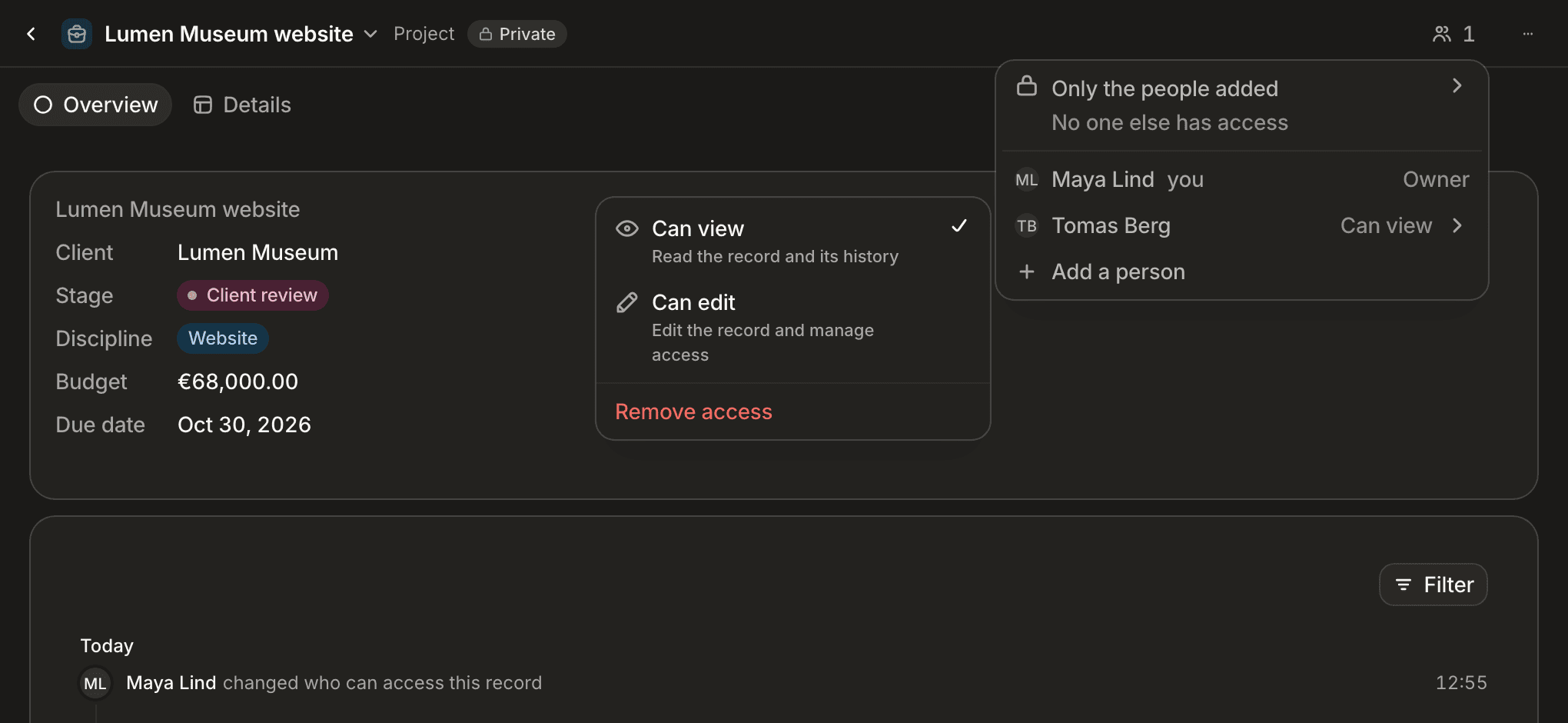
What each level allows
| Level | Records | Agents and routines |
|---|---|---|
Can view (reader) | Read values, relations, documents and the history since the share | Read the configuration and the run history (status, duration, cost) |
Can use (runner) | — | Also chat with the agent and run the routine, with your own connections and permissions; a routine run for each person also runs for you |
Can edit (editor) | Also edit values, link, attach documents, and manage who has access | Also configure it and manage who has access |
| Owner | Everything, including deleting, archiving, restoring and changing the mode | Everything, including deleting, archiving, restoring and changing the mode |
An editor can share with others up to Can edit, change a level, remove someone, or make a shared item private again. Only the owner changes the mode to or from the workspace, deletes, archives or restores.
The object's permissions stay the ceiling: a share never grants an action the member's role forbids on the object. For agents, the agents permission is the ceiling: managing access needs agents:update, running a routine agents:manage. A member who tries an action above their level gets 403; a member who cannot see the record or agent gets 404.
A grantee's history starts at the share: the record's activity before it was shared stays with the owner.
Sharing a record, an agent or a routine with someone, or raising their level, sends them one notification, delivered as they chose for its type (by default as a toast and in their inbox): "Bob shared Acme with you · reader", in the interface's language. It has the type access.granted and the kind fyi, opens what was shared, and carries payload.role, payload.actorName and payload.name (and payload.objectName for a record; a record with an empty label is named by its object). Each person added gets their own. Lowering a level, removing a share, sharing again at the same level, a meeting invitee's automatic share and a share to yourself send nothing. When an agent shares on someone's behalf, the notification names that person. After a share is removed the notification stays, and opening it answers like a missing item.
viewerAccess
A record read by id, listed, found by search (record search and global search hits alike) or returned by a write — single or bulk — carries viewerAccess, what the caller may do with it: owner, editor, runner (agents only), reader, or workspace for a workspace record. Use it to switch a record to read-only. A global search hit from an index built before record visibility existed carries neither visibility nor viewerAccess.
Routes
| Route | Who | Effect |
|---|---|---|
GET /records/:object/:id/access | anyone who can read the record | The audience: { recordId, visibility, ownedBy, viewerAccess, grants: [{ actorId, role, sources }] } |
PUT /records/:object/:id/access/:actorId | the owner or an editor of a private record | Body { "role": "reader" } or { "role": "editor" }. Shares the record, or changes the role. Answers the audience. |
DELETE /records/:object/:id/access/:actorId | the owner or an editor of a private record | Removes the share. Answers the audience. Removing a share that does not exist changes nothing. |
DELETE /records/:object/:id/access | the owner or an editor of a private record | Removes every manual share at once: the record is private again. Answers the audience. |
curl -X PUT https://api.standards.new/v1/records/deals/<recordId>/access/<actorId> \
  -H "Authorization: Bearer $STANDARDS_API_KEY" \
  -H "Content-Type: application/json" \
  -d '{ "role": "reader" }'
sources says why a member has access: manual for a share made through these routes, meeting_attendee for a meeting invitee the platform grants automatically. The routes above only add or remove manual shares.
Refusals
| Code | HTTP | When |
|---|---|---|
RECORD_GRANT_ON_WORKSPACE | 400 | The record is visible to the whole workspace. Make it private first. |
RECORD_GRANT_INVALID_ACTOR | 400 | The beneficiary is not an active member of this workspace (an agent, an API key, a removed member, someone from another workspace), or is the owner. |
RECORD_GRANT_UNSHAREABLE_OBJECT | 400 | The record belongs to memory or skill, which are never shared. |
AGENT_GRANT_ON_WORKSPACE | 400 | The agent or routine is visible to the whole workspace. Make it private first. |
AGENT_GRANT_INVALID_ACTOR | 400 | The member is not an active member of this workspace, or is the owner. |
Sharing an agent with someone who cannot see its private environment is refused with SCHEMA_VALIDATION_FAILED, naming the environment.
Making a shared record or agent workspace removes every share; making it private again starts with no one.
Agents and routines
| Route | Who | Effect |
|---|---|---|
GET /agents/definitions/:id/access | anyone who can read the definition | { definitionId, visibility, ownedBy, viewerAccess, grants: [{ actorId, role, sources }] } |
PUT /agents/definitions/:id/access/:actorId | the owner or an editor | Body { "role": "reader" | "runner" | "editor" } |
DELETE /agents/definitions/:id/access/:actorId | the owner or an editor | Removes that person's access |
DELETE /agents/definitions/:id/access | the owner or an editor | Removes everyone's access: the definition is private again |
A shared agent acts for whoever uses it, with that person's connections — never its owner's. On a private agent or routine, each person reads the input, output and error only of the runs that acted for them; of the others, the status, the duration and the cost: such a run answers input: {}, no output or error, and contentWithheld: true. A workspace agent's runs read in full for every member, as before. The agent's memory stays its owner's: a conversation started by someone it is shared with neither reads nor writes it. When an editor leaves — their access removed, or the member removed from the workspace — or drops below Can edit, the schedule and the triggers they armed run as the owner again, and each webhook they armed gets a new URL — the old one stops answering. Making an agent workspace removes every share.
On a private agent or routine, an editor sets its environment variables (POST and DELETE /agents/definitions/:id/env-vars); only the owner changes the roles of the agent itself (PUT /agents/definitions/:id/roles). A reader or a runner is refused both with 403 SCHEMA_FORBIDDEN. PATCH /agents/runs/:id/cancel stops a run for the person it acted for, or for the agent's owner; anyone else it is shared with is refused with 403 SCHEMA_FORBIDDEN.
Meetings shared with their attendees
A calendar event several members attend is synced once per attendee calendar, as a private meeting each. Each owner's copy is shared automatically, as reader, with the active members its own calendar invites — found by profile email, or by the address of a calendar they connected themselves (never through a shared mailbox). The owner and outside addresses are left out, and a workspace meeting (from a shared connection) gets no shares.
These shares carry the source meeting_attendee. They follow the calendar: every sync recomputes them, a backfill included (silently: open meeting lists refresh once it ends), and so does the owner's own change to the event (create, edit, reschedule). Removing the meeting through its calendar, or through the meetings surface, removes its shares; a plain DELETE /records/meetings/:id leaves them in place, inert while the record is deleted and back if it is restored. They are also recomputed when a member joins the workspace, when a member's own calendar finishes its first sync, and when a member's status changes: a suspended member leaves the audience of every meeting they were shared on, and gets it back when reactivated. They never touch a share the owner made by hand, and nobody else's copy is ever changed, merged or deleted.
A meeting read by id, listed, or returned to an agent carries:
| Field | Meaning |
|---|---|
viewerAccess | owner, reader, … — a reader copy is read-only: its meeting pane, grid rows and board cards take no edit, and a row delete leaves it out and says so. |
callKey | The call this copy belongs to (the provider event id). |
siblings | The other copies of the call you may see: { id, ownerActorId }. |
transcriptSource | Where the transcript and summary live: { meetingId, ownerActorId } of this meeting or of the organizer's copy of the call, or null. |
Lists show one entry per call: your own copy when you have one, otherwise the oldest you may see. When the copy you asked for was not recorded, GET /meetings/:id/transcript answers the transcript of the organizer's copy — only the copy owned by the organizer named by the calendar of the copy you asked for (your own calendar for your copy, its owner's for someone else's) — and says so in source (null when the transcript is this meeting's own):
{ "fullText": "…", "source": { "meetingId": "…", "ownerActorId": "…", "ownerDisplayName": "Karl" } }Reading an event with include: ["transcript"] answers the same fallback with recordedOn: { eventId, ownerName }. A recording read through the organizer's copy answers botId: null. The meeting bot records the organizer's copy when several copies share a video link. Outlook copies of one call carry different ids and are not merged yet.
Meetings synced before shares existed get theirs once per workspace, automatically, in the background after the deploy. POST /admin/meetings/grants-recompute { "tenantId": "…" } → 202 runs the same recompute again, as a retry or a repair (idempotent, deletes nothing). It needs the settings update permission; the tenantId must be the caller's own.
curl -X POST https://api.standards.new/v1/admin/meetings/grants-recompute \
  -H "Authorization: Bearer $STANDARDS_API_KEY" \
  -H "Content-Type: application/json" \
  -d '{ "tenantId": "<your tenant id>" }'
Sharing costs a sync page a fixed number of database statements whatever its size: 9 for a live page, 8 for a backfill page.
Mail synced from a member's mailbox
A mail synced from a member's own mailbox is private to them, unless one of its From, To or Cc addresses is a mailbox connected for the whole workspace: it is then workspace, as if that shared mailbox had synced it. This holds for mail stored before the shared mailbox was connected too: once its first sync completes, the private mail naming it becomes workspace. A mailbox a member connected for themselves never widens a mail, and a Bcc address does not count.
Deleting a mailbox or calendar connection
Deleting a mailbox or calendar connection (DELETE /connectors/connections/:id) keeps what it imported: its mail and meetings stay where they are. With ?removeImported=true they go too, for everyone, the owner included: every mail the connection synced that no other connected mailbox still holds is deleted for good, a mail another mailbox holds stays, and every meeting it synced is deleted as if its calendar had deleted it, its attendee shares with it; a workspace meeting a personal calendar synced into stays, since the shared calendar holds it. Only the owner of a personal connection can ask it: on a connection made for the whole workspace, or a personal one carrying a shared mailbox connected for the workspace, what it imported is the workspace's shared history, and removeImported=true is refused (403, SCHEMA_WORKSPACE_INVARIANT) with nothing deleted. Only the exact value true removes anything. A GitHub or Slack connection imports neither, so the option changes nothing there. A deleted mail can still match a search until the next re-index, and opening it answers like a missing one.
Shared with me
A list tab whose scope is shared lists the private records other members shared with you; it creates no record. The Agents and Routines lists offer Shared with me too.
Record graph
POST /relations/graph answers the links around up to 50 records or members in one call, for the Bubble block. It is the same graph the record's relations draw, read through the access rules above.
{
  "nodes": [
    { "type": "record", "object": "deals", "id": "0b1c…" },
    { "type": "user", "id": "7d2e…" }
  ],
  "limitPerNode": 50
}
nodes holds 1 to 50 entries, each a record (object and id) or a member (id is the profile id). limitPerNode is 1 to 200 and defaults to 50. A body outside these bounds, or an id that is not a GUID, is refused with 400 SCHEMA_VALIDATION_FAILED.
The answer has three parts: nodes (each with a key, a label, and for a member an avatarUrl), edges (from, to, the attribute that holds the link and its attributeLabel, plus the qualified properties or null), and hidden. Two records that point at each other collapse to one link.
Every node is checked for the caller: the record must be visible, the object readable, and a member node needs the people read permission (your own profile is always allowed). A node that fails any check is absent from the answer, never refused with a 403, so the response does not reveal that it exists. The same holds for neighbours: a record you cannot see is not a node and not an edge.
When a node has more visible neighbours than limitPerNode, hidden maps its key to { count, saturated }: count is how many were left out. Counting stops at a scan window of 20 times the limit, kept between 200 and 1000 links; past it saturated is true and count is a floor (at the default limit the badge reads "+950+").
Limits
- A signed file URL issued before a share was removed stays valid until it expires, one hour by default. A file already downloaded cannot be taken back.
- A new share can take a few seconds to show up in search results. A removed share never does: results are checked again before they are returned.
- If the organizer deletes an event from their calendar, their copy is deleted (and restorable), and the invitees lose its transcript with it.
SDK
const deals = standards.from("deals");
await deals.grantAccess(dealId, colleagueActorId, "reader");
const { grants } = await deals.listAccess(dealId);
await deals.revokeAccess(dealId, colleagueActorId);
await deals.clearAccess(dealId);
Next steps
- Records —
listAccess,grantAccess,revokeAccessandclearAccesson the typed query. - HTTP API / Requests and records —
viewerAccessand the other system fields. - HTTP API / Errors — the envelope every refusal shares.
- Records / Files and documents — how a share governs a record's drive.
- Book a demo