Vibecoding on Standards
One TypeScript file becomes a back office, a typed API and a tool your agent can query. Follow the model catalogue every Standards deployment reads at boot, from schema to production.
A coding agent writes a cron handler, a pricing rule or a public page in minutes. What it writes badly is everything behind them: tables, migrations, an admin screen, auth on that admin, permissions. Every prompt reinvents a slice of it, and that is where vibecoded apps rot.
On Standards you do not write that layer. You describe your data in one TypeScript file, sync it, and the workspace hands back a back office your team already knows how to use. The agent keeps the part it is good at: fetch something, decide something, render something.
This page follows one real app from its schema to production: the model catalogue at models.standards.new, which every Standards deployment reads at boot to know which AI models exist and what they cost.
The catalogue also carries a "harness" section: the models each external harness (Claude Code, Codex, Cursor) is offered when no key can list them live, in the order they appear in the model menu, one of them the default.
{ "harness": { "cursor": [{ "id": "auto", "label": "Auto", "isDefault": true }, { "id": "composer-2.5", "label": "Composer 2.5" }] } }A section a deployment cannot read is set aside on its own: the text, image and embedding models keep working, and the last valid harness lists stay in the menu.
The app in one paragraph
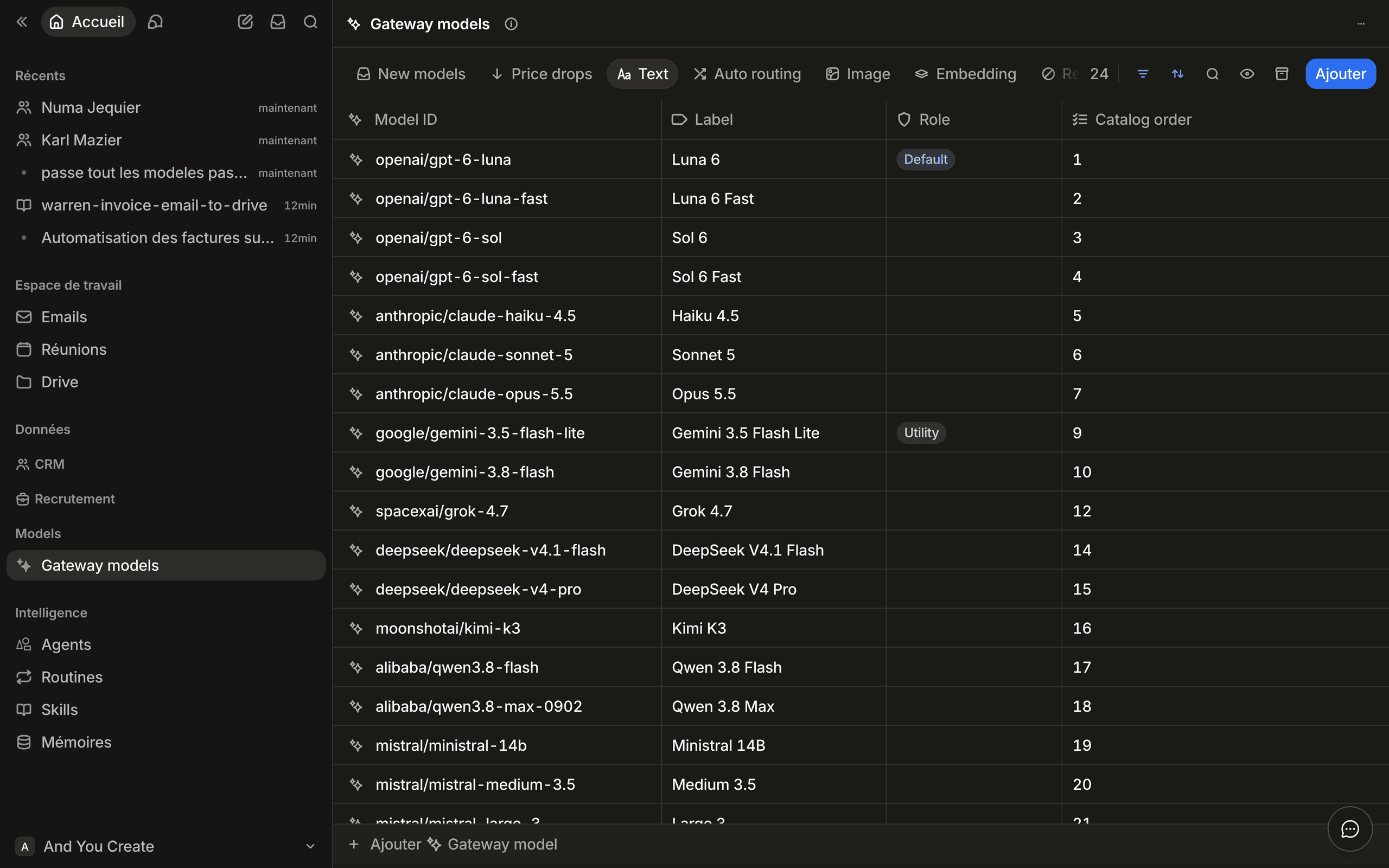
Every six hours, a cron reads the models the Vercel AI Gateway offers and writes one gateway-models record per model. A person curates them in the workspace: publish this one, reject that one, confirm a price drop. Every thirty minutes, a second cron publishes the curated rows as static JSON. The app has 42 attributes, 10 view tabs (eight on the list, two on the record), two work queues, and no admin component: its src/components folder only renders the public page.
From schema to back office
Describe the object
One object, two families of columns. Inventory columns are written by the cron and never by hand. Editorial columns are written by a person and never read by the cron.
// src/standards/schema.ts (excerpt)
export const gatewayModel = object("gateway-models", "Gateway model")
  .pluralLabel("Gateway models")
  .icon("sparkles")
  .description("Every model the Vercel AI Gateway offers, and what we decided about it.")

  // ---------------------------------------------------------------- inventory
  .attribute(
    text("modelId", "Model ID")
      .icon("hash")
      .description(
        "The Gateway id, e.g. openai/gpt-5.6. Unique: the aspirator matches a row on it."
      )
      .required()
  )
  .attribute(number("contextWindow", "Context window").icon("hash"))
  .attribute(
    status("status", "Status")
      .options(STATUS_OPTIONS)
      .description("A model absent from the Gateway becomes retired. It is never deleted.")
  )

  // ---------------------------------------------------------------- editorial
  .attribute(
    select("stage", "Stage")
      .options(STAGE_OPTIONS)
      .icon("inbox")
      .description("New until you look at it. Only published reaches the payload.")
  )
  .attribute(
    text("displayLabel", "Label")
      .icon("tag")
      .description(
        "The name the product shows, and the payload's `label`. Spelled `displayLabel` because `label` is a reserved attribute name on every object."
      )
  )
  .labelExpression("{{ modelId }}");
Each .description() becomes help text in the workspace, and it is also what the next agent reads before touching the column. Write it for both.
Sync it
const result = await standards.schema.sync(modelsSource);
// result.applied is false when the workspace already matches
The object appears in the workspace sidebar, with its grid, its filters and its forms. No migration was written, no table was created by hand, no admin page was built.
Turn questions into tabs
The list view has eight tabs. Six are slices of the catalogue (Text, Auto routing, Image, Embedding, Rejected, Retired). Two are work queues: they are empty when nobody has anything to do.
// src/standards/schema.ts (excerpt)
import { content, listView, query } from "@standards/client";

const catalogView = listView("gateway-models", "Gateway models")
  .for(OBJECT)
  .icon("sparkles")
  .default()
  .tab(
    "new",
    "New models",
    content
      .collection(query(OBJECT).eq("stage", "new").eq("status", "live").orderBy("firstSeenAt", "desc"))
      .table()
      .icon("inbox")
  )
  .tab(
    "price-drops",
    "Price drops",
    content
      .collection(
        query(OBJECT)
          .eq("stage", "published")
          .eq("pricingReviewPending", true)
          .orderBy("pricingChangedAt", "desc")
      )
      .table()
      .icon("arrow-down")
      .columns(
        "modelId",
        "displayLabel",
        "inputPricePerMillion",
        "outputPricePerMillion",
        "pricingChangedAt",
        "pricingConfirmedAt",
        "status"
      )
  )
  // … Text, Auto routing, Image, Embedding, Rejected, Retired
  .build();
New models is everything the Gateway started offering that nobody has judged yet:
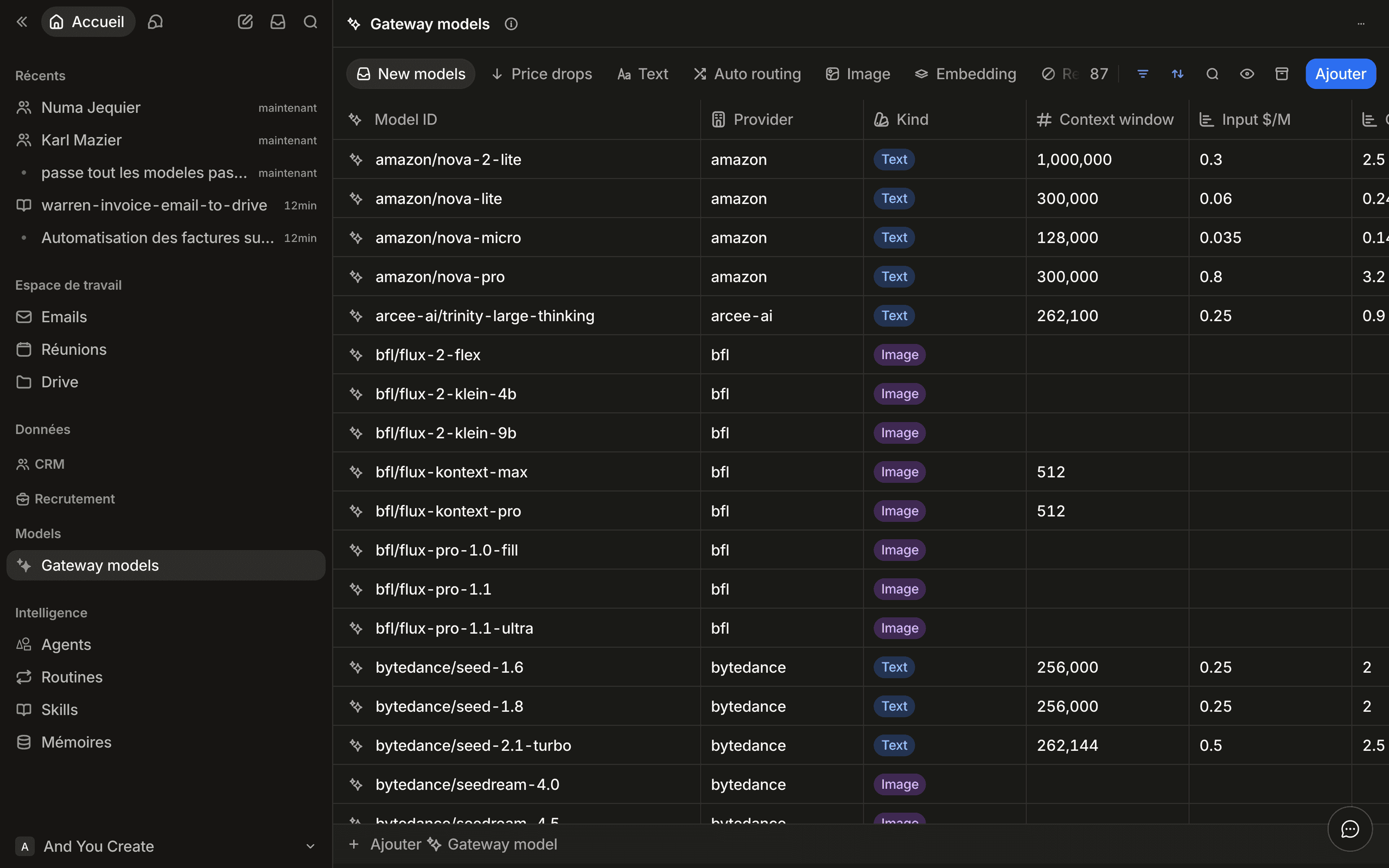
Price drops is every published model whose price fell and has not been ruled on. A lower price can be a promotion, and since the runtime reads it as a spend ceiling, a person decides before the new price is published. Most days the tab is empty, which is the point: a queue shows up only when someone owes a decision.
Nobody wrote a queue, a review screen or an approval button. The cron fills the queue by writing stage: "new"; the tab's filter shows it; a person edits one cell and the row leaves.
Shape the record page
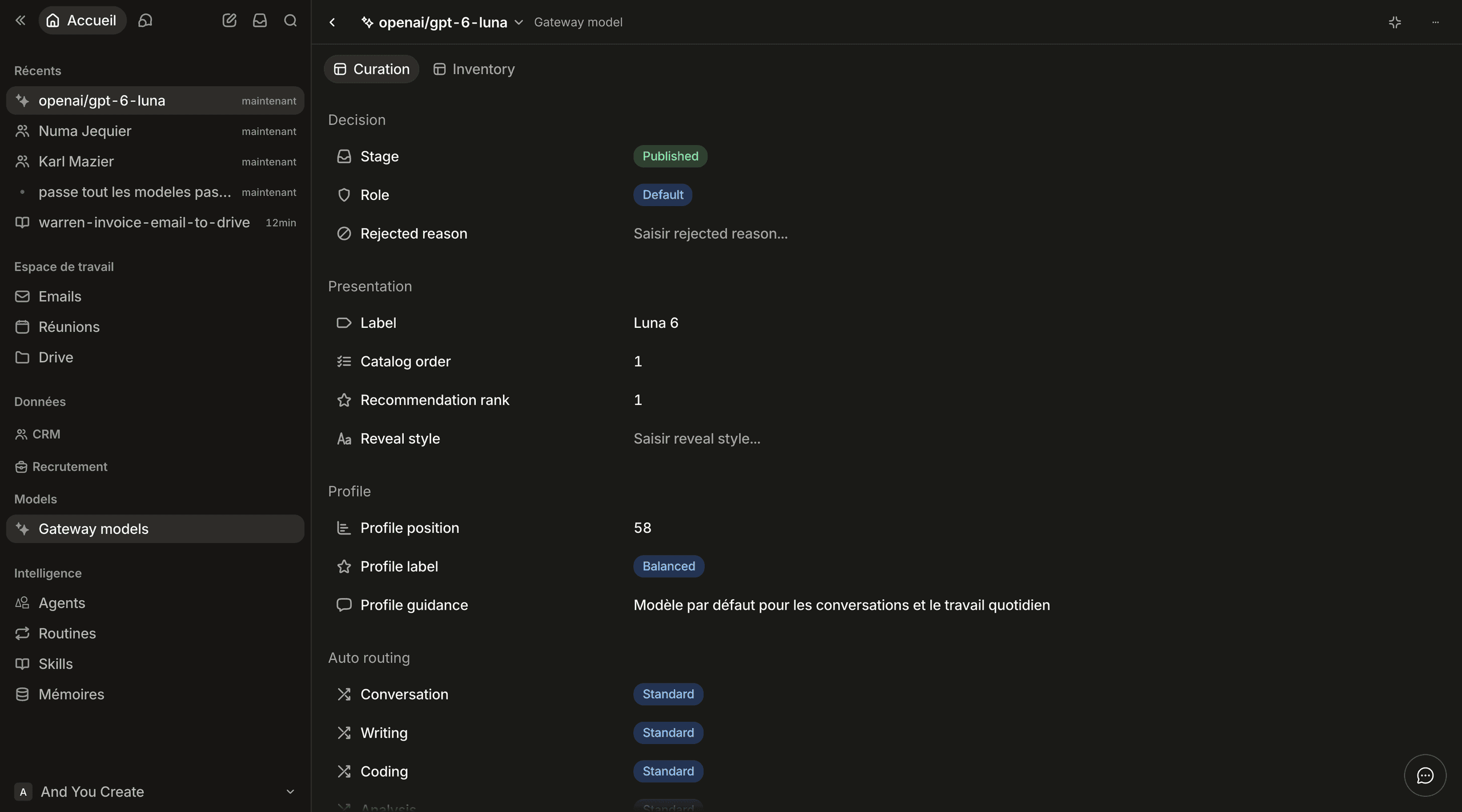
The detail view groups the editorial fields into a form, and keeps the cron's inventory on a second tab where nobody is tempted to edit it.
// src/standards/schema.ts (excerpt)
const catalogDetail = detailView("gateway-models-detail", "Gateway model")
  .for(OBJECT)
  .icon("sparkles")
  .default()
  .tab(
    "curation",
    "Curation",
    content.form(
      group("decision", "Decision").field("stage").field("role").field("rejectedReason"),
      group("presentation", "Presentation")
        .field("displayLabel")
        .field("catalogOrder")
        .field("recommendationRank")
        .field("revealStyle"),
      // … Profile, Auto routing, Image formats, Embedding
    )
  )
  .tab("inventory", "Inventory", content.form(/* identity, capabilities, pricing, lifecycle */))
  .build();

export const modelsSource = defineSchemaSource({
  id: "models",
  objects: [gatewayModel],
  views: [catalogView, catalogDetail],
});
Your team finishes the app
The schema is not a cage. In architect mode, anyone allowed to change the workspace can add an attribute, a filter or a whole tab to the view your code declared. Here, a Kanban tab is added to Gateway models from the tab menu:
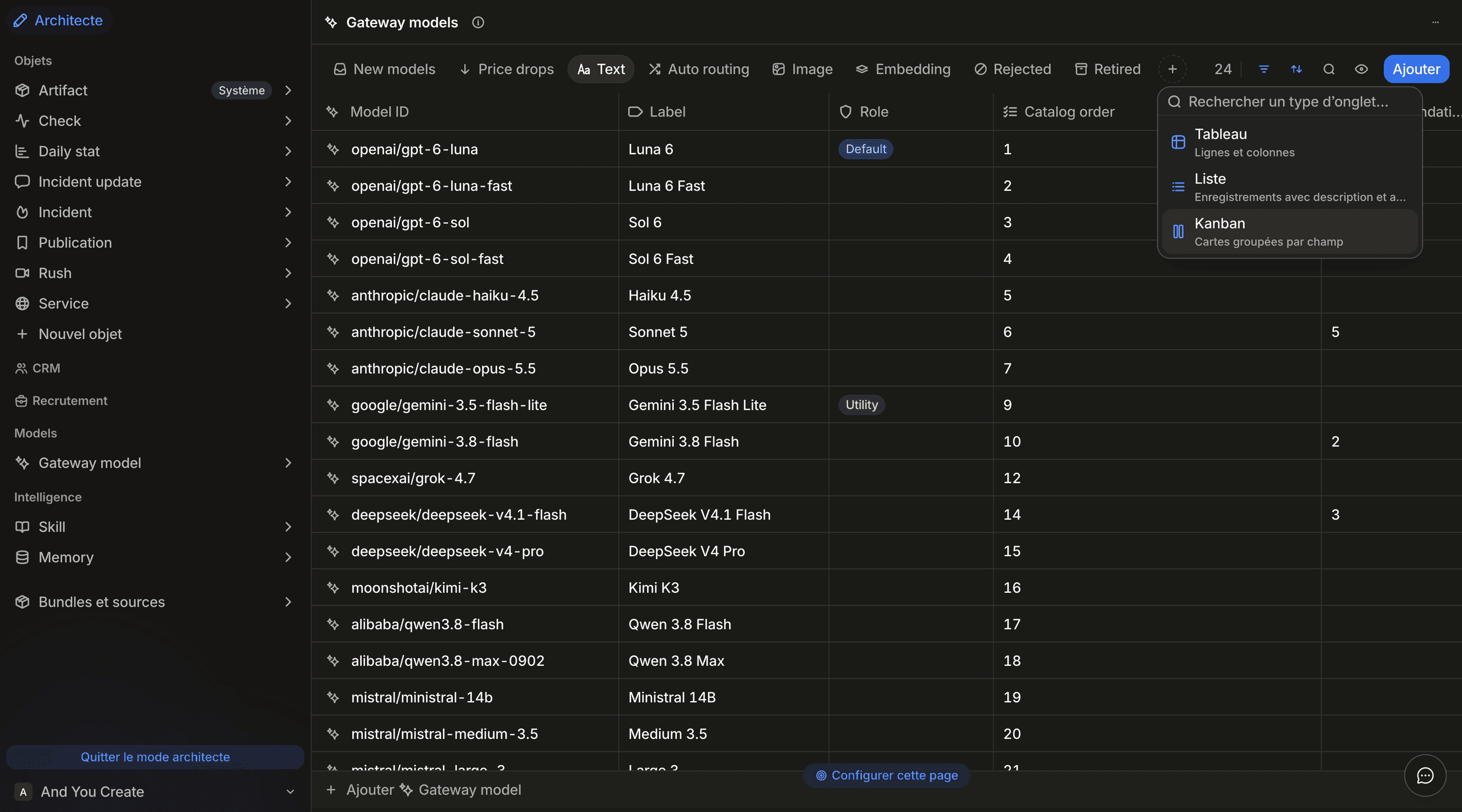
Published, it groups the same records by status. Nobody opened the repository:
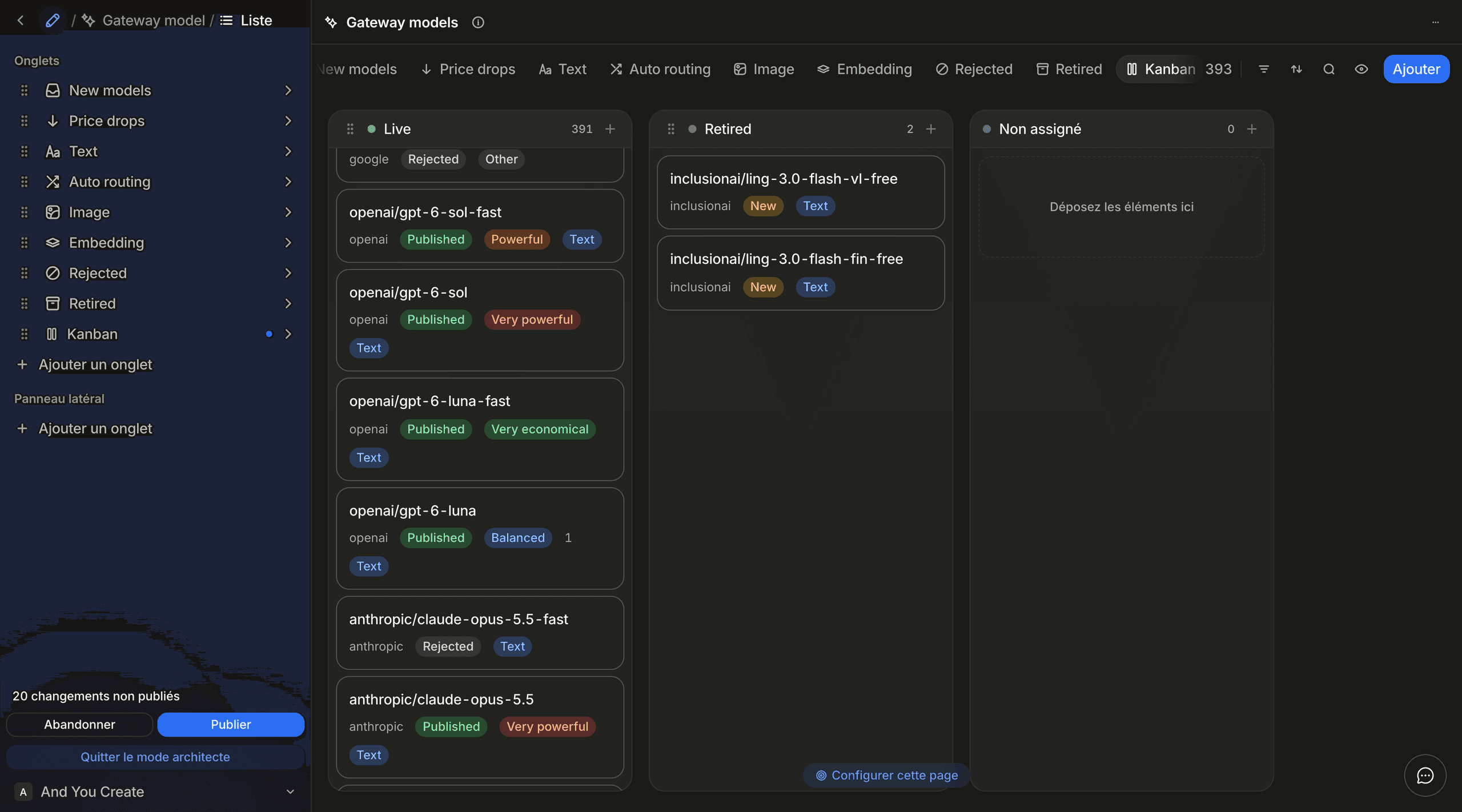
The next schema.sync keeps it. A view declared by a source stays owned by the source, and what the workspace layered on top of it is preserved (see Schema sources). This is what keeps a vibecoded app from turning into a ticket queue: a question the team asks every week becomes a tab they build themselves. When it proves useful, ask the agent to copy it into schema.ts so a new workspace gets it too.
Your agent sees the same data
The records the cron writes are also on the MCP server. Connect Claude Code to the workspace and ask it which models are waiting in New models: it filters the same object the grid shows, with the permissions of its key.
The agent that writes your code can read your real records while it writes the code that reads them. The Agent workflow cookbook covers the setup and what a read-only key removes.
The code the agent actually wrote
With the back office handled, what is left is small and testable.
The sweep syncs the schema, reads the Gateway in full, then upserts. The builder is the type, exposed as standards.gatewayModels by createStandards({ …, schema: modelsSource }): row.modelId is a string without a cast, and the input of rows.create() is typed from the same attributes.
The excerpts below call the template's own fetchAll, a hand-rolled pagination walk the SDK now ships as all().
// src/gateway/sweep.ts (excerpt)
const rows = deps.standards.gatewayModels;
const existing = await fetchAll(rows);
const byModelId = new Map(existing.map((row) => [row.modelId, row] as const));

for (const model of offered) {
  const values = inventoryValues(model, seenAt);
  const row = byModelId.get(model.id);
  if (!row) {
    await rows.create({
      ...values,
      stage: "new",
      firstSeenAt: seenAt,
      pricingReviewPending: false,
    });
    continue;
  }
  const patch = pricingPatch(row, values.gatewayPricing, normalizePricing(model.pricing), seenAt);
  await rows.update(row.id, { ...values, ...patch });
}
The publish asks for what people approved and the Gateway still offers, validates the payload, and only then writes the snapshot. A payload that would not parse leaves the previous one live.
// src/catalog/rows.ts
export type ModelRow = FetchResult<typeof gatewayModel>["records"][number];

export async function readPublishedModels(
  standards: StandardsRecords
): Promise<readonly ModelRow[]> {
  return fetchAll(
    standards
      .gatewayModels
      .eq("stage", "published")
      .eq("status", "live")
      .orderBy("catalogOrder", "asc")
  );
}
ModelRow is derived from the same builder the grid is defined with. Rename a column in schema.ts and the build breaks, not the catalogue.
Rules to give your agent
Copy these into the repository's AGENTS.md. Each one is a bug the catalogue did not ship.
- Split columns by owner. A column written by code is never written by a person, and the reverse, or a cron eventually overwrites a decision.
- Compute the queue, filter on a boolean. A filter rule compares an attribute to a literal, never to another attribute. When a queue depends on two dates, the cron writes the answer into a checkbox and the tab filters on it.
- Tombstone, never delete. A model that leaves the Gateway becomes
retired. That row is the answer to "why did it disappear". - Read everything before writing anything. A failed upstream call must leave every row untouched.
- Walk the pages. The REST API returns 20 records by default and at most 1000 per call; read with
all(), which walks them until the server says there are no more. - Name it
displayLabel.labelis reserved on every object.
The same pattern runs the open-source status page: services, checks and incidents are records, and the team reports an incident by creating one in the workspace. Its repository, andyoucreate/standards-status, is the one to fork.
Start your own
- Scaffold a Next.js app, add
@standards/client, and setSTANDARDS_API_URL(with/v1) andSTANDARDS_API_KEY. - Ask the agent for
schema.ts: the objects, and a list view whose tabs are the questions your team asks every day. - Sync, open the workspace, and adjust the tabs by hand until they feel right.
- Ask the agent for the cron or the page, with the client as its only dependency on Standards.
- Ship. From now on, the team changes data and views in the workspace, the agent changes code in the repository, and neither waits on the other.
Next steps
- Schema sources: what a sync owns and what it leaves alone.
- Views: tabs, filters, sorts and forms.
- Type safety: how a row's type follows the builder.
- Book a demo