How it works
Your code declares objects and pushes them to a workspace. Your users extend them in the app. The SDK, the CLI and MCP all call one REST API.
A workspace is a hosted backend: its schema, its records, its people and its API keys. Your code declares objects in TypeScript and pushes them with schema.sync. From then on, every client reads and writes those objects through the same REST API at https://api.standards.new/v1:
curl https://api.standards.new/v1/records/deals \
  -H "Authorization: Bearer stndrds_your_api_key"
The key carries its workspace, so the request names none. The key's roles decide which objects it may read and what it may change.
Five concepts
| Concept | What it is | Example |
|---|---|---|
| Workspace | One tenant: its schema, its records, its users and its API keys. | Your company's CRM |
| Object | A type of record. Declared in code, or created by a user in the app. | contacts, incidents |
| Attribute | A typed field on an object. Standards validates it on every write. | email, text, required |
| Record | One row of an object: an id, timestamps, and your attributes. | Marie Dupont |
| API key | The credential the SDK, the CLI and MCP all use. It never holds more than its creator could grant. | stndrds_… |
What your code owns, what your users change
Every object your code declares or your users create is system or runtime; the difference is who holds the pen. Standards' own objects are native.
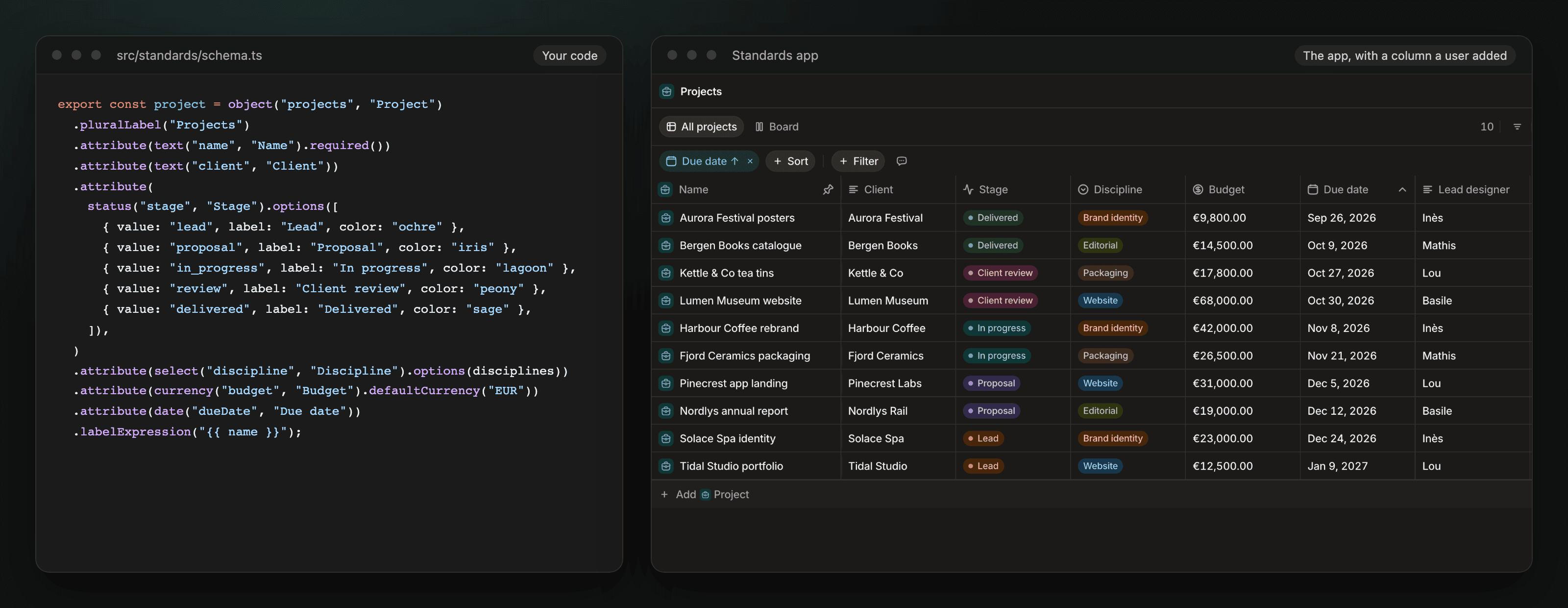
- System objects and attributes are the ones your code declares.
schema.syncwrites them, and they are immutable in the app: a user cannot rename, retype or delete them. - Runtime objects and attributes are the ones users create in the app (or over the API, with the
architect:createpermission). Your sync keeps them.
A user who adds a resolvedAt date to your incidents object and saves a filtered tab on it keeps both through every sync. The next unchanged sync answers in one GET and writes nothing:
await standards.schema.sync(source);
// { applied: false, hash: "3f9c…" }
Sync is strict where data is at stake. Rename a system attribute in code and the sync refuses with SCHEMA_AMBIGUOUS_CHANGE before writing anything, until you say whether to keep the values. Remove an attribute from your code and the next sync drops it with its values. Remove an object and it is demoted to runtime, with its records intact. A handful of native objects (skill, memory, drives, artifact, meeting) ship with every workspace and their names are reserved. Schema ownership holds the full table.
Three doors, one API
SDK
Declare your schema, sync it, then read and write typed records from any Node server.
CLI
List, search, create and update records from a terminal. JSON, table or CSV out.
MCP
Give Claude Code, Codex or Cursor the same access your API key has.
All three call https://api.standards.new/v1 and see the same permissions. Nothing you build with one is hidden from the others. Over MCP, an agent gets up to eight tools (search, query, read, write, edit_content, organize, delete, propose_memory), and a key that may not write gets no write tools.
What we host, what you own
We run the API, the database, search, file storage, the agents and the app at app.standards.new. You own the schema source, which lives in your repository, the code that calls the API, and the keys. Your code calls Standards from a server: createStandards refuses an API key inside browser code.
To run the same API under a hostname of yours, see Dedicated instances. For isolation, roles and sharing, see Security and hosting.
See it on your own data
Book a 30-minute demo with the team: cal.com/team/andyoucreate/introduction-30, or write to [email protected].
Next steps
- Quick start: declare one object, sync it, and write your first record in five minutes.
- Objects and records: the REST surface every door uses.
- Schema ownership: what a sync may change, and what it never touches.
- Book a demo