Agents and routines
Run agents on their own with routines, start them from record, form, schedule and webhook triggers, and switch a routine on or off.
An agent definition has a kind: agent or routine. An agent is someone you talk to in a conversation. A routine does not chat: it runs only when one of its triggers fires, or when you start it by hand. The kind is set at creation and cannot change afterwards. A PATCH that carries a different kind answers 400.
A routine is created with no triggers, so it starts off. It can start with empty instructions. name is required on create, but a blank one (only spaces) gives a routine called "Untitled routine".
On and off
A routine has no separate on/off flag. Its state comes from the switches that already gate automatic starts:
- every trigger's
enabled; - the schedule's
enabled.
The definition read returns active, which is true when at least one trigger is enabled or the schedule is enabled. POST /agents/definitions/:id/activation with { "active": true } or { "active": false } sets every trigger and the schedule in one transaction and returns the updated definition. Turning a routine back on never fires a schedule occurrence missed while it was off.
- Only a routine accepts activation. An agent answers
400. - Switching on needs something to fire: a routine with no trigger and no schedule answers
400withSCHEMA_VALIDATION_FAILEDand the message "Add a trigger before switching the routine on". Switching off is always accepted. - Restoring an archived routine brings it back off: its triggers stay disabled and its schedule is switched off until you switch the routine on again.
- A system definition answers
403withSCHEMA_SYSTEM_ENTITY_IMMUTABLE, on this route and on every other mutation of a system definition or its triggers. - A trigger created on a routine without an explicit
enabledfollows the routine: disabled while the routine is off, enabled while it is on. On an agent, or with an explicit value,enabledkeeps its own default oftrue.
POST /agents/:definitionId/run starts a run whatever the routine's state. Use it to test a routine before you switch it on.
The definition read also carries scheduleNextRunAt, the next occurrence of an enabled schedule, computed by the server.
Triggers
A trigger belongs to one definition. eventType selects what starts a run:
eventType | Fires when | Extra fields |
|---|---|---|
record.created | A record of objectId is created. | objectId (required), filter |
record.updated | A record of objectId changes. | objectId (required), watchedFields (up to 50), filter, debounceMs |
record.deleted | A record of objectId is deleted. | objectId (required), filter |
form.submitted | A form is submitted. | formDefinitionId |
webhook | Its URL is called. | continuationKey; the server issues the URL |
watchedFields is accepted only on record.updated. filter takes { combinator: "and" | "or", rules: [{ attribute, operator, value }] } with the operators of record filters. A PATCH cannot turn a trigger into a webhook trigger or a webhook trigger into another type.
A schedule is not a trigger row: it lives on the definition as schedule: { cron, timezone, enabled }, set with POST or PATCH /agents/definitions. A schedule sent on POST is stored disabled, whatever its enabled: switch it on with PATCH /agents/definitions/:id (schedule.enabled: true) or POST /agents/definitions/:id/activation.
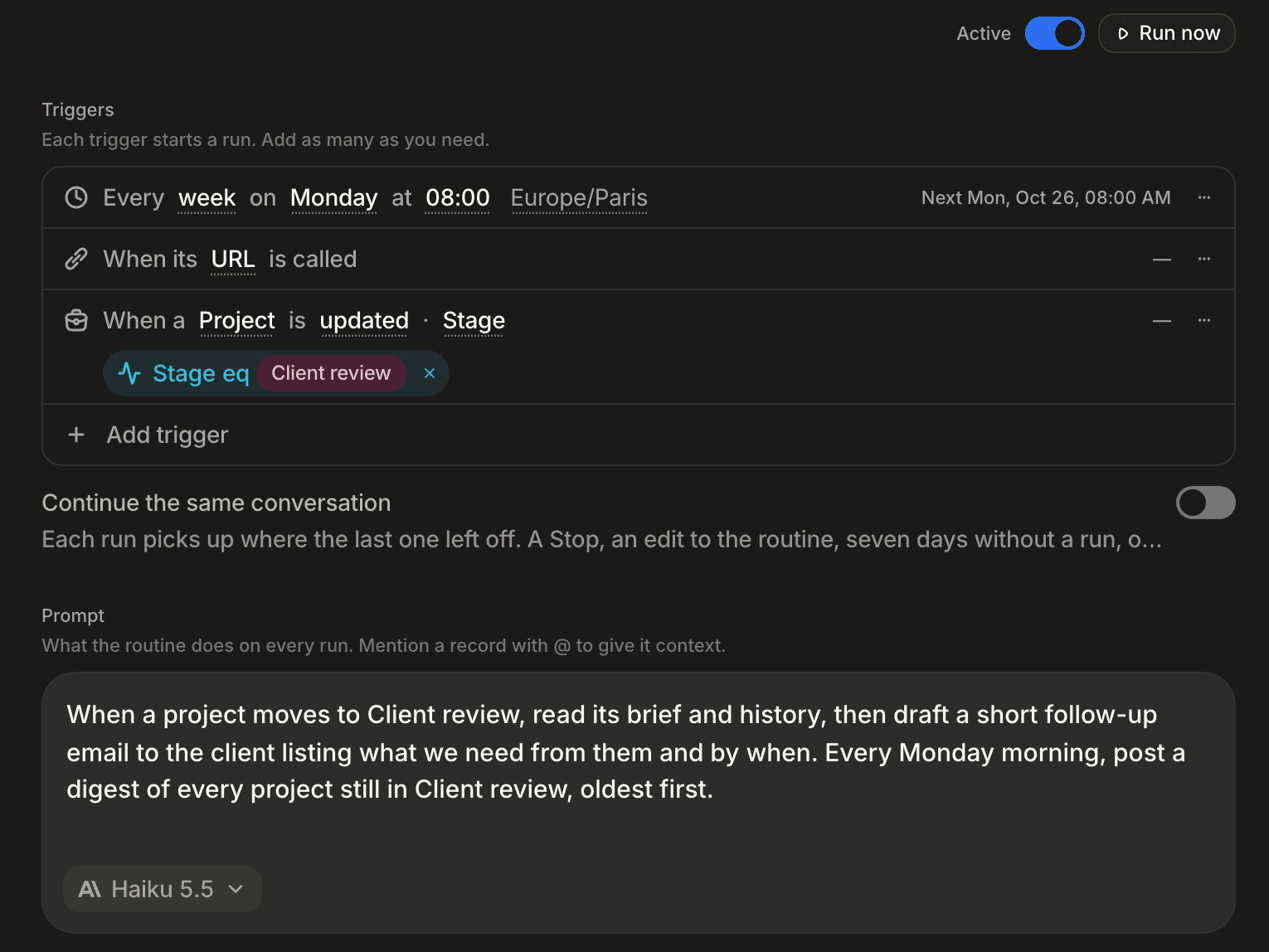
Whatever starts it, the trigger's input reaches the model inside a <user_data> block, as data and never as instructions.
Webhooks
A webhook trigger starts a run each time an external service calls its URL. The server generates the URL when you create the trigger. You cannot choose it: a webhookPath sent by a client is ignored.
Read the URL from the trigger's webhookUrl. It is a bearer secret that starts runs acting for the trigger's author (see Whose access a run uses), so only the author receives it; every other reader, managers included, sees the trigger without webhookUrl. When the trigger's author changes — someone edits the trigger, switches the routine on or off, or edits what it does (prompt, tool grants, model, critic, harness or environment) — the URL is replaced and the old one answers 404: give the new URL to the calling service. A workspace API key (one without an owner) is never shown a URL: a webhook trigger it creates, edits or rotates has no reader of its URL until a person edits or rotates it, so create webhook triggers as a person or with a personal key.
curl -X POST "$WEBHOOK_URL" \
  -H "content-type: application/json" \
-d '{"type":"deployment.error","project":"status-page"}'| Status | Body | Meaning |
|---|---|---|
202 | { "eventId": "…" } | Accepted. The run starts asynchronously, so no run id exists yet. |
404 | empty | Unknown URL, disabled trigger or deleted definition. Every case answers the same way. A private routine's URL is accepted like any other. |
413 | empty | The body is over the size limit. |
429 | empty | More than 60 calls in the last 60 seconds for this URL. |
Body. A JSON or application/x-www-form-urlencoded body reaches the run as the parsed object, unchanged. A structured JSON type such as application/vnd.api+json is parsed as JSON too; if it does not parse, it arrives as { "raw": "<the body>" }. Any other content type is read as text and wrapped as { "raw": "<the body>" }. The limit is 256 KB, or your host's parser limit if lower.
Last call. For every call that reaches an existing trigger, the trigger records lastCall: { at, status, payload, truncated }. The stored payload is cut to 16 KB, with truncated: true when it was cut. Unlike the URL, the payload is not a secret: every reader of the definition sees it.
Rotation. POST /agents/triggers/:id/rotate-webhook issues a new URL and returns the updated trigger. The old URL answers 404 immediately.
Continuing a conversation
By default every call starts a run in a conversation of its own, so a routine called again starts from zero. Set continuationKey on a webhook trigger to the place in the body where the caller says which conversation a call belongs to, written as a dotted path: event.thread_ts for the replies of one Slack thread, ticket.id for the updates of one ticket. A call whose body carries a value there continues the conversation the last call with the same value opened. Its run reads everything said before, and its request is the conversation's next message. A call without a usable value there starts a conversation of its own as before: the path is absent, holds an object, a list or an empty string, or holds text over 512 characters. A number is read as its decimal text. null in a PATCH removes the key. Only webhook triggers take one.
Every call is still its own run, with its own status in GET /agents/runs; the runs of one conversation share its session. A conversation takes a call only once it is quiet: a call that arrives while the conversation is still answering, waits for someone's answer, or has a reply of yours not yet answered starts a conversation of its own, and the later calls with its value continue that newer one.
A conversation is continued only for the person the trigger acts for: when the trigger's author changes, the next call starts a new conversation for the new author. It ends, and the next call with its value starts a fresh one, when:
- the last call to it was more than 7 days ago,
- it holds 25 calls,
- it was stopped: a Stop on one of its runs, or on the conversation itself, ends it for every later call,
- the routine itself was changed after the conversation opened: its prompt, model, tools, name or any other setting of the routine (a conversation keeps the configuration it opened with; editing a trigger does not end it),
- or it was archived.
Continuing a conversation on a schedule
By default each occurrence of a schedule starts a run in a conversation of its own. In the routine's Triggers, under its schedule, switch on Continue the same conversation; through the API, set schedule.continueConversation to true on PATCH /agents/definitions/:id. Each occurrence then continues the conversation the previous occurrence opened: its run reads everything said before, and its request is the conversation's next message. false, the default, goes back to a conversation per occurrence. Changing the schedule without continueConversation keeps it.
The conversation ends, and the next occurrence starts a fresh one, on the same terms as above: a Stop, an archive, any change to the routine — switching this on included — 7 days and an hour without an occurrence (so a weekly schedule that runs a little late still continues), or 25 occurrences. An occurrence that finds the conversation still answering, waiting for someone's answer, or holding a reply of yours not yet answered does not wait, unlike a trigger's fire, which waits up to 10 minutes for it to go quiet: it starts a conversation of its own at once, and the later occurrences continue that newer one. A schedule that runs for each person keeps one conversation per person.
Whose access a run uses
A run executes as its agent and is limited to what the person it acts for may do: the trigger's author for a triggered run, the schedule's armer for a scheduled run, the caller for Run. Editing what a routine does — its prompt, tool grants, model, critic, harness or environment — makes you the author of all its triggers and its schedule; switching it on or off, or editing a trigger, makes you that trigger's author. Renaming it changes nothing. A trigger whose author was suspended or removed is switched off at its next start; switching it back on makes you its author. A private routine still runs on its schedule and its triggers: private decides who sees and configures it, not whether it runs. Switching a routine private, or back to the workspace, makes you the armer of its enabled schedule and needs the same agents:manage as arming it; switching it private also makes you the author of all its triggers, so it keeps running under you, and a webhook trigger someone else authored gets a new URL. GET /agents/triggers returns each trigger's createdBy, GET /agents/definitions/:id the schedule's scheduleArmedBy, and GET /agents/runs each run's authorityActorId.
Who sees a routine's runs
A run acts for one person: whoever pressed Run or called POST /agents/definitions/:id/run (for a personal API key, the key's owner), the author of the trigger that fired it, or whoever switched its schedule on. Its conversation belongs to that person: they list it among their conversations, open it and receive its live updates. A run's conversation opens on its request, as the first message: the routine's prompt, then the trigger's message. A run that continues a conversation adds its request as that conversation's next message. Every other reader of the routine, its creator included, sees the run in the list from GET /agents/runs?definitionId=, with status, time and source — and its error, unless the routine is private (see Sharing) — but cannot open it: its session answers 404.
When a run ends failed, the person it acts for receives one notification, titled by the routine's name: "“Name” failed", in the interface's language. Opening it opens the run's conversation. It has the type agent.routine_run.failed and the kind system, and carries the routine's name in payload.routineName. A run no longer times out, so agent.routine_run.timeout is no longer sent; an item of that type stored earlier keeps its own title. A run on an environment notifies the same way. A run that completes or is cancelled sends nothing; a conversation with an agent notifies only when it waits for your answer. How a notification reaches each person follows their own delivery choice for its type: as a toast and in their inbox unless they turned that off, and by mail when they asked for it and the workspace offers mail (GET /notifications/channels lists email then). Each person chooses it per type in Settings › Notifications: an In-app switch, and an Email switch when the workspace offers mail. A notification that waits for your answer, such as a conversation waiting on you, always shows in the inbox, so its In-app switch stays on, and a sensitive one is never mailed.
GET /agents/definitions/activity returns one summary per definition you can see:
{
  "definitionId": "…",
  "lastRunAt": "2026-09-26T08:00:04.000Z",
  "lastRunStatus": "failed",
  "lastRunError": "AI Gateway key is invalid",
  "running": 0,
  "runs7d": 12,
  "failed7d": 1
}
The counts cover only runs of definitions you can see. lastRunError carries the latest run's error, cut to 200 characters, while that run failed; otherwise it is null. In React, useAgentDefinitionsActivity re-reads the summary every 30 seconds while it is mounted, since only the person a run acts for receives its live updates.
GET /agents/runs?definitionKind=routine&limit=50 lists the newest runs of every routine you can see, across routines, newest first. It takes definitionId or definitionKind; a request with neither answers 400 with the code SCHEMA_VALIDATION_FAILED. The same rule holds: you see every run of a routine you can see, and open only the runs that act for you.
GET /agents/definitions/activity/daily?days=188 counts runs and failures per routine you can see and per UTC day, over the last days UTC days, today included. days goes from 1 to 366 and defaults to 188 (26 weeks, whatever today's weekday); anything else answers 400 with the code SCHEMA_VALIDATION_FAILED. The answer is sparse: a day without a run has no row. Agents, runs without a definition and deleted routines are left out.
[
  { "definitionId": "…", "day": "2026-09-25", "runs": 3, "failed": 1 }
]
Sharing
A private agent or routine can be shared with named members at three levels — Can view, Can use, Can edit — from its Access row (see Sharing). Whoever uses a shared agent is its authority: their connections, their permissions, their runs; running a routine still needs agents:manage. On a private agent or routine, a member reads the content of a run — input, output, error — only when that run acted for them; any other run answers input: {}, no output or error, and contentWithheld: true. A workspace one's runs stay readable by every member. A routine's schedule and triggers run as whoever armed them; an editor who changes what the routine does arms them in their name, and an editor who leaves hands them back to the owner. A webhook URL changes when the person who armed it loses edit access (removed, moved below Can edit, or every share cleared): the old URL answers 404, and the new one is shown to the owner. The agent's memory is not shared: a conversation started by someone it is shared with neither reads nor writes it.
Running a routine for each person
A private routine with a schedule can run once for each person who can use it, instead of once for whoever armed the schedule: a morning recap that every member receives about their own day, from one routine. In the routine's Triggers, under its schedule, switch on Run for each person who has access. Only the routine's owner sees the switch, and only while they hold the routine-audiences permission, which only owner holds by default. Through the API, set schedule.runFor to "audience" on PATCH /agents/definitions/:id; "armer", the default, goes back to one run for the armer. Changing the schedule's time without runFor keeps the mode.
At each occurrence of the schedule, the routine runs once for its owner and once for each person it is shared with at Can use or Can edit, read at that moment; a person shared with at Can view gets no run, and a suspended or removed member is left out. Each run acts for its person: their permissions, their session, and a run whose content only they read. The owner and editors see each run's status, duration and cost, never its content. The routine's memory is neither read nor written.
Each run can do only this, whatever else is wired:
- read records, documents and files its person may see;
- read its person's own mailboxes and calendars, when the routine holds The mailboxes of the person it runs for (
email.read:@authority) orcalendar.read:@authority; a person with no connected mailbox gets no mail tools, and the run carries on with the rest; - create records, always private to its person;
- notify its person, with the
notifytool, when the routine holdsnotifications.
Switching the mode on removes, in the same write, every tool outside that scope; the confirmation names them. Such a routine holds only notifications, email.read:@authority and calendar.read:@authority; @authority grants are accepted on such a routine only, and the editor offers the mailbox one; calendar.read:@authority is granted through the API. While the mode is on, only the owner may change the routine's prompt, tools, model, critic, environment or schedule; an editor still renames it and manages who has access. The mode needs a private routine without a harness or an environment: opening the routine to the workspace switches the mode off and removes its @authority grants in the same write. If the owner loses the permission or their access, the next occurrence switches the schedule off and runs for nobody; a run refused for one person never stops the others.
A person who receives runs and does not want them leaves the routine: Leave this routine in the routine's ⋯ menu or in the menu of one of its notifications, or DELETE /agents/definitions/:id/access/:actorId with their own actor id. It removes their own access only, without agents:update.
Notifying the person a run is for
The notify tool, from the notifications group, sends one notification to the person the run acts for, and to nobody else. It takes a title (1 to 120 characters), a body (up to 500 characters, plain text, never rendered as markdown), a priority (normal, high or urgent, high by default) and an optional subject ({ objectName, recordId }): clicking the notification then opens that record, which must be visible to the person. A run sends at most one: a second call, or a retry, answers the notification already sent. It has the type agent.routine_run.notice and carries the routine's name, always shown as its source. An urgent notification stays on screen, at the top right, until its person closes it; important ones received while away are listed when they come back. Its person chooses how it reaches them in Settings › Notifications, under From a routine, like any other type. notifications is granted to routines only: on an agent it answers 400 AGENT_TOOL_GROUP_ROUTINE_ONLY.
A refused switch answers 400: AGENT_SCHEDULE_AUDIENCE_ON_WORKSPACE (not a private routine), AGENT_SCHEDULE_AUDIENCE_HARNESS (a harness or an environment), or AGENT_SCHEDULE_AUDIENCE_TOOL (a tool outside the scope, named in the message). A writer who is not the owner, or does not hold routine-audiences:create, gets 403.
In the app
The sidebar's Intelligence section opens with two entries: Agents at /agents, then Routines at /routines. The Routines badge counts the routines you can see whose last run failed, and clears once the next run succeeds. In the chat panel, the sidebar lists three sections: Conversations (your general conversations, flat), Agents (one group per agent, its face showing whether one of its conversations is working, waiting for you or failed), and Routines (one row per routine you can see). A routine row reads like a conversation row: its name, its last run's status and time. Clicking it opens that last run if it is yours, and the routine's page otherwise. A routine that is switched off is dimmed; + opens the Routines page. A routine's run never appears among conversations, nor in the conversation search, even once the routine is archived.
Routines (/routines) lists your routines as cards: the name, what starts it, and a status line with the last run and the next one, or the failure and its error, or "Paused", and its model. A private routine (visible to its owner only) shows a lock after its name, on its card and its page; so does a private agent. Each card has the routine's switch and, if you can manage routines, a Run button: it asks first, runs the routine once even when it is off, then opens its page. Deleting a routine lives on its page. The page opens on its title, "Routines", and one line saying what routines are; then a bar with the Routines / Monitoring switch, a search, Add (named "New routine"), which creates an off routine and opens its page, and the button that shows or hides Recent runs.
Recent runs floats at the right edge like a routine's runs panel: the latest runs of every routine you can see, under each routine's name, the most recently active first. The runs that act for you open in the AI panel; the others are listed but cannot be opened.
Monitoring shows, for the routines you can see, a heat calendar of the last six months: one square per UTC day, darker with more runs, the day's count and busiest routines on hover. Click a day to count only that day in the header, Shift+click another to count a range, click the day again or press Escape to go back to six months. Below it, By routine · 30 days draws each routine's last 30 days as a smoothed curve, failed days marked in red, with its total and failures; the busiest routine comes first. A routine's own page shows its calendar above Triggers. Monitoring needs agents:read and at least one routine.
Under the bar, a tile explains what a routine is, in one sentence and three steps, with a link to this page; close it and it stays closed in this browser, except on an empty list, where it always shows. The Agents list has the same tile for agents. Each section of a routine's or an agent's page (Triggers, Prompt, With) carries one line saying what it is for.
Below the cards, Get started offers ready-made routines. A template shows only when your workspace has what it needs: the companies, deals or meetings object, a contact form, or a deals stage with a "won" option. Picking one creates the routine off, with its instructions and its trigger (disabled until you switch the routine on) or a schedule in your timezone, and opens its page. With no routine yet, the templates are the whole page.
A routine's page (/routines/:id) opens on a breadcrumb: Routines, with its icon, back to the list, then the routine's name: click it to rename it in place (Enter or leaving the field saves, Escape restores). At the far right of the header, the menu with Delete, then one button that shows or hides the runs panel. There are no tabs. The content column opens on a bar that says who created the routine, then its state, its switch and Run now, which starts a run at once and opens the runs panel on it; then the routine's activity calendar and the configuration:
- Triggers (triggers and schedule, each naming at the top of its ⋯ menu who it Runs as: the trigger's author or the schedule's armer, whose rights its runs use — see Whose access a run uses; the menu, and so that line, shows only to those who can manage the routine) and Prompt: the instructions, in a frame like the chat composer's, with the model picker at its bottom left.
- With, rows like the architect panel's: Environment (Standards, our agent, by default; or an environment: a harness such as Claude Code, which then runs the routine instead of our agent, or a machine prepared by a setup script; the prompt's model picker then lists that harness's models), Tools (core, then each granted group and connector; add or remove them here), Variables (how many variables the routine has, and how many workspace variables it inherits; click to add or delete one), Access (Workspace, Shared · N people, or Private) and Budget per run (a cost limit, edited in a popover: Enter or a click outside saves, Escape cancels, empty means no limit).
In the prompt, type @ to mention a record; it is saved as a link, [@Acme](stndrds:record/companies/…). At each run, and at each message for an agent, the mentioned records bring their memory page to the agent, as a record mentioned in the chat does — not their values, which the agent reads with its tools. A record whose run cannot see it (the routine's trigger author or schedule armer, or as you for an agent) or that was deleted brings nothing, and so does a page the run cannot see; the prompt itself keeps the mention as written. The prompt brings the pages of five mentioned records at most. In a conversation, a record you mention in a message brings its page on that message instead, five records per message at most. Only an agent or routine with memory on reads them; see Memory.
The Runs panel floats at the right edge of the page: the routine's runs, newest first. The runs that act for you come first; clicking one opens it in the AI panel. Runs that act for someone else follow, under a note saying why, and cannot be opened. The panel closes with its own button, with the header button, or with Escape; the app remembers whether you keep it open. While it is open the configuration makes room for it. On a narrow window it starts closed and, once opened, covers the page.
Tools and connectors
Every agent and routine lists what it may use in toolGroups. Nothing is inherited: a capability that is not listed is not there.
- Core is always on and cannot be removed: records, documents and files (bounded by data permissions), skills, and the conversation tools (questions, to-dos, work mode, compaction).
- Native groups are granted by name:
sandbox,web,image,memory,bulk,activity,orchestration,host,notifications(routines only, see Notifying the person a run is for), andcloud-browser(a blank cloud browser) on an instance that offers cloud browsers. - Connectors are granted one resource at a time:
mcp:<serverId>,email.read:<connectionId>,email.send:<connectionId>,calendar.read:<connectionId>,device:<deviceId>,browser:<deviceId>,browser-profile:<profileId>(a cloud browser started from that profile),login:<loginId>(a workspace login the agent may sign in with).
email.read and calendar.read let an agent search and read, never send or change anything. email.send lets an agent answer mail from that mailbox, and read it too; in the editor it is Send from this mailbox. It is granted by mailbox id only, never as @authority, and a mailbox connected without sending is refused with AGENT_TOOL_GROUP_SCOPE_MISSING: reconnect it with sending first. Holding email.read alone gives no drafts and no send. The default chat holds email.send on every connected mailbox that can send, and every send still asks.
With email.send, an agent replies to an email in two steps:
writecreates a reply draft,draft:<id>, from anemail:<id>it can read, withmodereplyorreply_alland a body in Markdown (paragraphs, bold, italic, links, lists; headings, tables, code, images and HTML stay plain text). Recipients, subject and threading follow the email, as in the mailbox composer. The draft belongs to the person the agent works for: it shows in their mailbox and they can finish it by hand. When the thread already holds their draft, the agent gets that draft back unchanged and rewrites it on purpose.readanddeletework on drafts too, on reply drafts only: a forward or a new message you started stays out of the agent's reach.senddelivers the draft, and always asks first, whatever the conversation's approval mode or the agent's approval policy. The card shows the sender, every recipient (bcc included), the subject, the attachments and the text that will leave, up to 5,000 characters, and flags any recipient who is not part of the thread. Only the version shown leaves: if the draft changes after the card opened, nothing is sent and the agent proposes the send again. A card for a message too long to show in full, or one whose preview could not be built, cannot be approved and offers only Refuse: send a long message from the mailbox; for a missing preview the agent can propose the send again. A routine run holding the grant leaves the draft and waits on the card.
A message that left but whose copy is not stored yet is reported as sent, and the agent does not send it again. Drafts and send are not offered on MCP or to a harness.
The legacy fields tools, mcpServers and canDelegate are rejected by the API with 400: list grants in toolGroups instead.
An agent or routine created in Standards (the app, the API or the AI) without toolGroups starts with every built-in you may grant it: activity, bulk, image, memory, orchestration, sandbox and web, plus host where the app provides its own tools. A routine — or an agent with its schedule on — created by someone without agents:manage starts without sandbox and host instead of being refused. Remove what the agent should not use. An explicit list is kept as given; [] means core only. Existing agents keep their grants, and an agent defined in code with agent() starts with ["memory"] unless it lists .toolGroups([...]). A defined agent has its granted MCP servers active from the first step.
A shared (workspace) agent can only hold workspace connectors. To use a private connector, make the agent private: a private agent can also hold its owner's private ones, and a device can only be granted to its owner's private agents. Switching a private agent to the workspace is refused while it holds a private connector: remove it first. Routines cannot hold devices or paired browsers; they can hold cloud-browser and browser-profile:<profileId>.
Granting sandbox, host, cloud-browser or any connector (a browser profile included) to something that runs with nobody present — a routine, or an agent with an enabled schedule or trigger — needs agents:manage. Everything else needs agents:update.
A sub-agent inherits its parent's grants, minus orchestration.
activity is the activity include of read: reading record:<id> or user:<id> (user:self is the actor the agent writes as) with include: ["activity"] gives a record's change history — who created or changed what, when, with each field's old and new value — or one actor's record changes across the workspace, newest first, 20 entries by default and 100 at most. It needs audit:read and read access to the record's object; a record the agent cannot see answers like one that does not exist, and a change that names a record it cannot see is left out. The general chat loads it when it needs it. It is not an MCP tool.
calendar.read scopes the calendar tools only. Meetings and transcripts are records, governed by data permissions like any other record.
A refused grant answers 400 with one of AGENT_TOOL_GROUP_UNKNOWN, AGENT_TOOL_GROUP_NOT_CONTAINED, AGENT_TOOL_GROUP_SCOPE_MISSING, AGENT_TOOL_GROUP_HARNESS, AGENT_TOOL_GROUP_NEEDS_PERSON, AGENT_TOOL_GROUP_ROUTINE_ONLY (the notifications group granted to an agent rather than a routine). A connector that is not visible to you answers 404.
Deleting an MCP server, a connection or a browser profile, or removing a device, removes its grants from every agent. Disconnecting keeps them; the agent simply gets no tools from it until it reconnects. A mailbox or calendar whose sync is failing, or that waits for you to reconnect it, keeps its read tools over the mail and events already synced. Every agent and routine knows, at each turn, which mailboxes and calendars it can read, by address, and which connected accounts it holds but cannot use, with what each needs. Asked for a mailbox or calendar it does not hold, an agent or routine says it must be granted in its configuration and carries on with the rest of the task; the default chat sends you to your settings to connect it.
When a mailbox or calendar you connected for yourself breaks, whether its sync fails or a send, a mailbox read or a calendar change is refused its sign-in, you receive one notification, delivered as you chose for its type (by default as a toast and in your inbox), naming the account: "Gmail [email protected] needs to be reconnected" when you must sign in again, or "… stopped syncing" when it keeps failing, in the interface's language. It has the kind system, the type connector.connection.reauth_required or connector.connection.error, and carries payload.provider, payload.account and payload.connectionId. It is sent once per break: further failing passes send nothing, and the account breaking again after it recovered sends a new one. Disconnecting an account yourself sends nothing, and a mailbox connected for the whole workspace notifies nobody.
A mailbox or calendar is connected for the whole workspace from Settings → Workspace integrations, which first warns that every member will be able to read it. Every member then also sees it in their own Your integrations list, marked Shared with the workspace with the name of the member who connected it, never as their own; a connection made before the name was recorded shows the mark alone. A connection carries that member as connectedByActorId (null when it was not recorded).
GET /agents/definitions/:id/tool-catalog returns what an agent holds and what you may grant it, each tool with its name, risk and whether it asks for approval.
Agents (/agents) opens on its title and one line saying what agents are, then shows your agents as cards with their model, under the same bar (search, Add, and the button for Recent conversations: your latest conversations, under each agent's name). Clicking a card starts a conversation with that agent without leaving the page; its gear, shown on hover, opens the agent's page. Below the cards, Get started offers ready-made agents (a sales assistant, a meeting prep, a follow-up writer, a pipeline analyst, customer support, account research), each shown only when your workspace has the objects it works on (deals, companies, meetings or contacts). Picking one creates the agent with its instructions and opens its page, to review them before a first conversation. An agent's page (/agents/:id) has the same header and bar, the bar naming its creator and model with New conversation; its instructions and properties fill the page and Recent conversations, your conversations with it, float in the panel. A system agent's page is read-only.
Every session row reads the same way, in the sidebar and on these pages: one status dot where a link keeps its icon, then the title, then the time. A blue pulsing dot means it needs you, red means its last turn failed, a grey pulse means it is still running; a finished conversation shows a faint small point instead. An unread one has its title in bold. A failed run adds its error on a second line. On hover, the time gives way to the row's menu.
A routine's run opened in the AI panel names the routine and the run's date, with ‹ › to step to its other runs (for its creator) and View routine.
The floating button at the bottom right is round. It shows the face of the agent you are talking to in the side panel, or a chat icon; while that agent is working, waiting for you or has failed, it stretches to say so in one word. It hides while the side panel is open.
A routine's switch stays disabled until it has a trigger or a schedule. Routines never appear in the chat's agent picker. An unknown id, or one you cannot see, shows a not-found page with a link back to the list.
Memory
Every agent and every routine has a memory profile: one page of what it learned about doing its job, beside the workspace profile and each member's profile. It reads them at the start of every conversation or run. How pages are written — agents propose with propose_memory, a background pass writes — and who may shape a shared page are described in Skills and memories.
On by default. Memory is the memory grant in toolGroups (see Tools and connectors): the memory kind on search and read, plus the propose_memory tool. A new agent or routine starts with it, like every other built-in, and the general chat always has it. An agent or routine without it has memory off: its next conversation or run has no memory in its prompt, no memory tools, no pages from mentioned records, and adds nothing to anyone's memory. Add or remove it in the Tools row like any other group.
On the agent's page, the Memory section, below the configuration, shows the agent's profile, read-only, with an Open the page link to its record in Memories (the Profiles tab). To change it, edit it there: its content is a rich text that people who hold the agents update permission and may edit the agent edit like any other; each line they add is signed with their name and the date, and an edit that would take the page past 4,000 characters answers 400 with SCHEMA_VALIDATION_FAILED. Everyone else reads it. With memory off, the section reads Memory off and points to the Tools row. A routine's profile is written and read the same way; its page does not show it yet.
The profile follows its agent: it is visible to the people who can see the agent, switches with it between the workspace and private, and is deleted with it.
Appearance and starter suggestions
An agent has a face: one of twelve shapes, a colour and a base emotion. A routine never has one, and neither does the general chat. Without a chosen appearance, the face is derived from the agent's id, so every agent looks different and keeps its look.
Declare it in code with .avatar(), and up to four suggestions for its start page with .starters():
import { agent } from "@standards/schema";

export const PIPELINE_ANALYST = agent({ name: "pipeline-analyst" })
  .systemPrompt("You analyse the pipeline.")
  .model("anthropic", "claude-sonnet-5")
  .toolGroups(["memory", "web"])
  .avatar({ type: "hexagon", color: "lagoon" }) // expression defaults to "relaxed"
  .starters(["Which deals need a follow-up this week?", "Summarise my open pipeline"])
.build();typeis one ofoctopus,clover,flower,triangle,square,blob,circle,drop,hexagon,pill,pebble,puddle.coloris any hue of the Standards palette except the neutralstone:clay,brick,terra,ochre,moss,sage,lagoon,ink,iris,peony.expressionisrelaxed(default) orneutral.startersholds at most 4 items, each 1 to 200 characters once trimmed..starters([])declares none.- The agent builder no longer has
.icon(), andAgentDefinitionno longer hasicon.
Over the API, POST /agents/definitions and PATCH /agents/definitions/:id accept avatar ({ type, color, expression }) and starters (an array of strings); null on a PATCH removes either, and starters: [] is stored as none. A bad shape answers 400. Sending either to a routine answers 400 with SCHEMA_VALIDATION_FAILED, on create and on update, whether or not the request names the kind.
On the agent's page, the With block gains Appearance (the face; click it to pick a shape, a colour and an emotion, or Random, or Default to go back to the derived face) and Starter suggestions (up to four rows, reordered by their grip; a row saves when you leave it or press Enter, and an empty row is dropped). A routine's page and a system agent's page show neither: a system agent takes both from its code.
Starting a conversation with an agent shows its face, name and description, then its model, the icons of its granted groups and a lock when it is private, then Your conversations with that agent (hidden when there are none), then its own suggestions — or the general suggestions when it has none. The general chat keeps its greeting and shows your latest general conversations. The composer reads Ask {agent}…. Each of the agent's turns opens with its face and name.
GET /agents/definitions/activity also returns lastRunSessionId: the latest run's conversation, only when you may open it (you created it or its root conversation, or the agent actor); otherwise null.
Environment variables
An environment variable is stored at one of three layers: the whole workspace, your own (a private secret), or a single agent (its Variables row on the page, alongside how many workspace variables it inherits). They merge in that order, the last one winning: the agent's value over yours, yours over the workspace's. A new key must be UPPER_SNAKE_CASE; a key already saved before this rule stays editable under its existing name.
Your private secrets live under Settings → Execution → Secrets, in the card My secrets; the workspace's are in the card Workspace secrets below it. A private secret reaches only the runs that act for you, on any agent including a shared one, and their sub-agents: a run another person starts on the same agent gets their secrets, never yours, and a run that acts for nobody gets no private layer. Creating one needs private-secrets:create, which every member holds; only you can list, change or delete yours.
A key saved mid-conversation — through request_setup or from settings — reaches the sandbox on the very next turn, even when that turn resumes a sandbox that was already running: every command carries the turn's resolved variables, not only the ones the sandbox was created with. A key deleted since the sandbox was created reaches the next command blank rather than lingering with its old value — for sandboxes created from this release on, which record the key names they were created with; an older sandbox keeps such a key until it is recreated. A device paired to run commands never receives environment variables, whatever their layer.
Logins
A secret is a variable (a key and its value) or a login: a name, the sites it may sign in to (https:// addresses, stored as their origins), a login, a password and, optionally, a 2FA key — a base32 key or an otpauth://totp/ URI (SHA1, SHA256 or SHA512; 6 or 8 digits; any period, 30 seconds by default). A login is yours or the workspace's, never an agent's. Its name is free text, up to 100 characters, and shares its scope's names with the variables: a name a variable already holds answers 409 SCHEMA_DUPLICATE, and a secret never changes from one kind to the other. Updating a login keeps every value you do not send; "totp": null removes the 2FA key.
A login's values never leave Standards: every route answers its name, sites, whether it holds a 2FA key and its exposeToSandbox flag, never its login, password or key. That flag puts the login in the sandbox (below). A login is not a variable: it is absent from the harness's environment and from the key names get_agents and request_setup count — a login named GITHUB_TOKEN does not provide GITHUB_TOKEN — and an unexposed one is absent from the sandbox too. Every member sees the workspace's logins by name and site; only a holder of env-vars creates, changes or deletes one.
In Settings → Execution → Secrets, each card's Add menu offers Login or Variable, added to that card: My secrets for yours, Workspace secrets for the workspace's. The New login dialog takes a name, the allowed sites (each typed site becomes a chip; app.example.com reads as https://app.example.com), the login, the password, an optional 2FA code — a base32 key or an otpauth://totp/ URI, pasted — and Also in sandbox scripts, off by default. A login with no site is not created: the dialog stays open on the sites field. A login's row reads Login · app.example.com, followed by 2FA code when it holds a key, and when it was last used or modified. Its menu offers Edit, Replace values and Delete: reopened, the dialog shows each stored value as •••• with Replace, and saving sends only the values you replaced. A member without env-vars sees the workspace's logins in Workspace secrets by name and site, with no menu and no Add.
A run may use your private logins on any agent, including a shared one, and their sub-agents: they reach the runs that act for you, never anyone else's, and a run that acts for nobody gets none. The general chat and its sub-agents may also use every workspace login; any other agent or routine uses only the workspace logins granted to it as login:<loginId> under Logins in its tools, which needs edit access to it, and agents:manage on something that runs with nobody present. A private login is never granted (AGENT_TOOL_GROUP_NOT_CONTAINED): it needs no grant. A harness agent holds no login. The system prompt lists the logins a run may use by name and sites — Dougs (https://app.dougs.fr) — never a value. Deleting a workspace login removes it from every agent and routine that was granted it.
Also in sandbox scripts (exposeToSandbox) puts a login in the Standards sandbox of the runs that may use it, as variables named after it: the name without its accents, in upper case, every other character an underscore. « Qonto équipe » reads as QONTO_EQUIPE_LOGIN, QONTO_EQUIPE_PASSWORD and, with a 2FA key, QONTO_EQUIPE_OTP. A name starting with a digit keeps it — « 2FA Box » reads as 2FA_BOX_LOGIN — and such a variable is read with printenv 2FA_BOX_LOGIN, since the shell does not expand $2FA_BOX_LOGIN. <NAME>_OTP holds the code valid when each command starts, computed again for every command: the 2FA key itself never enters the sandbox.
- Who gets it. A run that may use the login (above) and acts for someone: a private login reaches its owner's runs; a workspace login also needs the person the run acts for to hold
env-vars:read. A harness copy never gets a login, nor does a command sent to a paired device. - Where it sits. A workspace login's variables come after the workspace's variables, a private login's after your private variables, and the agent's own variables last: a variable of the same name in a later layer wins, key by key. A login whose variables a connection reads never reaches the sandbox: « Standards GitHub » would read as
STANDARDS_GITHUB_LOGIN, the GitHub connector's, so it is left out. A login is one credential set: one without a 2FA key clears a<NAME>_OTPan earlier layer set. Two logins of one scope reading as the same names: the one created last wins. - What the model sees. The system prompt names the variables, never a value. Every value is replaced by
[REDACTED]in command output; a code, in the output of the command it was computed for and of every command started within the next period (30 seconds by default) — a code a script saved to a file, say. An older code shows, by then expired. A file a script writes is not redacted: a value saved to it is readable by whoever gets the file, once uploaded or published.
Built by the architect
Architect mode reads and writes agents and routines with two tools, offered only to a person (or an agent whose authority) may create or update agents. To the same people — who can also use Architect — the empty chat suggests both: Create an agent and Create a routine among the Architect cards, and an agent and a routine example in the normal chat. Asked from Execute mode, the assistant first requests the switch to Architect, where these tools live.
get_agents lists what the caller can see — id, kind, name,
description, active, one trigger summary line each — or, given an id,
the full definition: prompt, model, toolGroups, schedule, triggers
(hasWebhook, never a URL or path), visibility, and a revision fingerprint
used to detect a change since the tool last read it. Passing
include: ["available"] adds what the setup can be built from: models sorted
with the recommended ones first, the native tool groups, per connector kind the
resources the caller may grant (MCP servers already connected plus the catalog of
ones it is not), and, only when
the reader may read environment variables, the names of the workspace's
variable keys — never a webhook secret, never a variable's value.
upsert_agent creates or patches a whole setup — the definition (with its
toolGroups), its schedule, its triggers — in one call, always behind one approval card that
shows the whole thing (or, on an update, just what changed). A created
definition always starts off, exactly like one made by hand; an update never
touches the routine's current on/off, whatever its schedule or triggers
say. Updating requires the revision get_agents returned: a stale one means
someone changed the definition since it was read, and the tool answers a
conflict with nothing written. An input naming a model, a tool group or a
connector the caller cannot actually use is refused outright, with a readable
reason, rather than repaired — the card never offers to create a setup that
cannot exist.
API
All routes sit under https://api.standards.new/v1. Call the public webhook route through the webhookUrl the API returns; never build it yourself.
| Route | Permission | Purpose |
|---|---|---|
GET /agents/definitions?kind=agent|routine | agents:read | List definitions; no kind lists both. |
POST /agents/definitions | agents:create | Create; kind defaults to agent. |
POST /agents/definitions/setup | agents:create | Create or patch a definition with its schedule and triggers, in one transaction; never switches anything on or off. Finer rules (agents:manage for triggers, or for a schedule that is or becomes enabled) are enforced inside. |
GET /agents/definitions/activity | agents:read | Run summary per visible definition. |
GET /agents/definitions/activity/daily?days= | agents:read | Runs and failures per visible routine and UTC day. |
POST /agents/definitions/:id/activation | agents:manage | Switch a routine on or off. |
POST /agents/:definitionId/run | agents:manage | Start a run by hand. |
GET /agents/runs?definitionId= | agents:read | Runs of one definition. |
GET /agents/runs?definitionKind=routine | agents:read | Newest runs of every visible routine. |
GET /agents/triggers?definitionId= | agents:read | Triggers, with createdBy (the author) and webhookUrl for the author only. |
GET /agents/triggers/:id | agents:read | One trigger, with createdBy (the author) and webhookUrl for the author only. |
POST /agents/triggers | agents:manage | Create a trigger. |
PATCH /agents/triggers/:id | agents:manage | Update a trigger. |
DELETE /agents/triggers/:id | agents:manage | Delete a trigger; a webhook URL stops answering at once. |
POST /agents/triggers/:id/rotate-webhook | agents:manage | Replace a webhook URL. |
POST /hooks/:token | none | Public webhook entry point. |
GET /agents/definitions/:id/memory | agents:read | The agent's memory: memoryGranted and its profile page (null until one is written). A page's content is edited through PUT /records/memory/:id. |
GET /env-vars/private | none | Your private secrets, variables and logins, metadata only (visibility: "private", ownedBy you); never anyone else's. |
POST /env-vars/private | private-secrets:create | Create or replace one of your private variables (key, value). An agent cannot call it. |
POST /env-vars/private/logins | private-secrets:create | Create or update one of your private logins (kind: "login", name, allowedOrigins, login, password, optional totp and exposeToSandbox; with id, update that login). Answers its metadata. An agent cannot call it. |
POST /env-vars/logins | env-vars:create | Create or update one of the workspace's logins, same body. Answers its metadata. |
GET /env-vars/logins | none | The workspace's logins, metadata only. |
DELETE /env-vars/private/:id | none | Delete one of your private secrets; any other id answers 404 ENV_VAR_NOT_FOUND. |
The /env-vars/private routes act for the calling actor itself, never for the person it acts for. A personal API key lists its own secrets, an empty list, not its owner's, and cannot create or delete one of its owner's: it answers 403 on POST and 404 on DELETE. An agent likewise reads none of the secrets of the person it runs for. Manage your private secrets from your own session.
A definition runs on the Standards default unless it names a harness or an environment: harness ("claude-code", "codex" or "cursor") alone picks that harness's default, environmentId picks a custom environment and takes its harness. Both are accepted on POST and PATCH /agents/definitions, null clears them on PATCH, and attaching either needs environments:read. See environments for the settings a harness disables and the models it accepts.
The typed client does not cover most of these routes. Call them through createTransport:
import { createTransport } from "@standards/client";

const transport = createTransport({
  baseUrl: "https://api.standards.new/v1",
  apiKey: process.env.STANDARDS_API_KEY!,
});

const routine = await transport.post<{ id: string }>("/agents/definitions", {
  kind: "routine",
  name: "Deployment triage",
  model: { provider: "anthropic", model: "claude-sonnet-4-6" },
});

const trigger = await transport.post<{ id: string; webhookUrl?: string }>("/agents/triggers", {
  definitionId: routine.id,
  eventType: "webhook",
});

await transport.post(`/agents/definitions/${routine.id}/activation`, { active: true });
In React, client.applyAgentSetup(input) does cover the setup route: it creates or patches a definition with its schedule and triggers in one call — toolGroups on definition takes the grants described in Tools and connectors, each connector visible to the writer and within the definition's own visibility — and useApplyAgentSetup() wraps it as a mutation. Like the HTTP route, it never accepts enabled: nothing it writes is switched on.
Next steps
Read environments to run a routine, an agent or a conversation with a coding harness or on a machine you prepared, errors for the codes these routes return, and roles and permissions for the permissions a key needs.
GitHub and Slack triggers
Install GitHub or Slack in Settings → Workspace integrations, then add a trigger from the routine's Triggers section. Each trigger is an editable sentence: choose its event, repositories or channels, sender and conditions. GitHub covers issues, pull requests, reviews, comments, pushes, branches and tags, workflows, checks, project items, releases, discussions and repository activity. Slack covers mentions, messages, direct messages, reactions and channel membership.
The default sender is a person, excluding bots and the Standards App. Me means the trigger author's GitHub login or Slack account, not the person whose message happens to arrive. Runs use the trigger author's current permissions. Messages and event bodies are supplied as external data, not system instructions: each event as its normalized fields (the text, sender, channel or repository, files and thread history) and the provider's event body. The body comes whole, with every id an API call needs, less its credentials, the rich-text blocks that restate a message's text, thumbnails, the GitHub API's own links and repeated values, and the run reads it as indented lines rather than raw JSON.
Public Slack channels are joined when selected. For a private channel, invite the app with /invite @Standards, then choose Refresh in the channel picker. The picker reads Slack again; reconnecting the integration is unnecessary.
Same conversation is enabled by default. Replies in a Slack thread, or events on the same GitHub issue or pull request, resume the existing conversation. An occupied conversation waits in the queue, checking every 15 seconds for up to 10 minutes. After that wait, a new conversation opens. A Stop, archive, definition edit, seven days without a fire, or 25 fires also starts a new conversation. Disable continuation on a trigger to start afresh each time.
Adding a GitHub trigger adds its installation's GitHub access to Tools; adding a Slack trigger adds Read Slack and Write to Slack. You can undo these additions. A GitHub grant requires a sandbox or an environment with a harness. GitHub has no separate agent tools: the agent uses git and gh as its authority, after that person chooses Link my account in integrations. It never borrows the installer's credentials. An explicitly supplied GH_TOKEN Variable takes precedence.
A GitHub installation grant enables this account credential; it does not restrict it to that installation. GitHub authorizes the intersection of the person's access and the App's permissions across the installations they can access. The grant picker explains this scope.
Slack access is split between reading (slack_read, slack_find, slack_download_file) and writing (slack_send, slack_react, slack_set_status). Slack acts as the workspace bot; its token is never copied into the environment. Tools return Slack error codes such as not_in_channel so the agent can explain what needs attention.
A top-level Slack message sent from an app conversation links its thread back to that conversation. Human replies return to it under the posting turn's authority. A final answer is mirrored into linked Slack threads unless that same turn already sent its answer there. This works with Standards, Claude Code and Codex. Disconnecting an installation leaves its triggers and grants visible but unusable; deleting it removes dependent references.