Pages
Standalone pages and record pages built from blocks on a 12-column grid, where the workspace lands, who sees a page, and how it is edited.
A page is a screen of the workspace made of blocks: an indicator, a
chart, an agenda, a record card, a list of records, a text, the viewer's inbox,
the links around a record (Bubble). Standalone pages are listed in the
sidebar's Pages section and open in the app at /-/<name>.
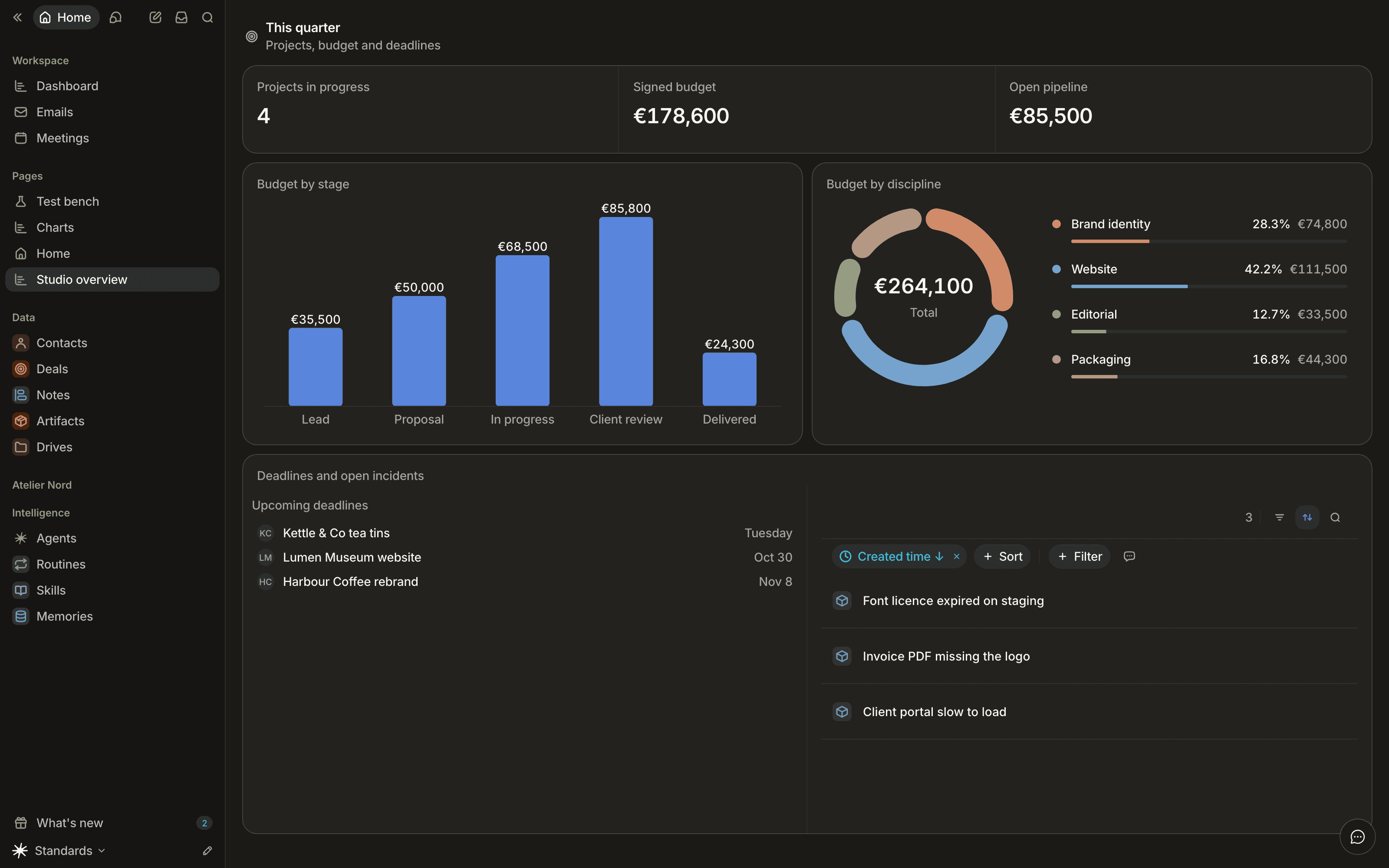
There are two kinds:
| Kind | Is | Renders |
|---|---|---|
| Standalone page | A page with no object: a dashboard, the workspace Home | For the viewer, with no record |
| Record page | A page attached to an object | For one record of that object, inside a record tab |
A record page is shown through a tab of the object's record view, the usual example being a Synthèse tab on a contact: the tab references the record page by name, and every block on it reads the open record (its notes, its activity, its card). A standalone page can never be a tab, and a record page can never be the Home.
Blocks on a 12-column grid
Each block is named (its name is stable, never a position) and occupies a cell
of a 12-column grid: a column x, a row y, a width w and a height h.
A block is 3, 4, 6, 8, 9 or 12 columns wide; no other width exists. Cells stay
inside the 12 columns and never overlap.
The grid has gravity. A block rises until it meets the block above it, and placing or resizing a block pushes the blocks in its way down. A move is never refused because it overlaps another block: the neighbours make room. A new block lands at the end of the page, except an indicator, which joins the indicators already at the top.
Each block declares layout traits that keep the page tidy without the author doing any arithmetic:
| Trait | Meaning |
|---|---|
| default size and minimum width | Where a block starts and how narrow it may go |
| height mode | fit takes the height its content needs (measured in the browser), up to a maximum, then scrolls inside; flexible stretches between a minimum and a maximum; fill takes the height of the page's scroll area, alone in its rows |
| minimum and maximum height | The bounds of the height, in rows |
| figure | An indicator-like block, drawn in a band when grouped |
A content can override its height mode (height in the architect, .height() in
the SDK). Only one block per page can fill, and it sits alone in its rows;
any further fill renders as flexible.
Groups
A group puts 2 to 4 blocks side by side in one frame. A group made only of
figures (a strip of indicators) is drawn as a band; any other group is one
shared card with its members separated inside. Each member stays a block of
its own, with its own name, settings and permissions. A group is made, extended
and split in architect mode or by the agent (group_view_contents,
ungroup_view_contents), and declared in code with .row(blocks, { group: {} }).
Naming an existing group in group_view_contents adds blocks to it, up to 4.
Ungrouping splits the group's cell among its members side by side; a member
whose height follows its content (fit) takes back its own height rather than
the group's, and what sat below moves up.
Removing a member from a group of three or four leaves a smaller group; a group
left with one block dissolves, in architect mode as when your code stops
declaring a member. A group whose members are all gone shows nothing and
leaves no gap.
A group is as visible as its members: a member the viewer cannot read is left out of the group, and an unknown or a hidden name answers "not found" in the same way.
Headings
A heading block titles a section: a title, an optional description and an
optional icon, on its own full-width row. In the editor it is edited in place.
Clearing its description removes it; the title stays required. In code it is
.heading(title, { name, description, icon }) on the page builder.
Responsive by container
The page adapts to the width of the area it is drawn in, not to the screen. In
a container at least 1024px wide it shows the 12 columns. From 768px it shows 6
columns, derived from the 12 (widths are halved, never below a block's minimum,
and groups stay whole). Below that it is one column, in reading order (top to
bottom, then left to right), each block at its content height. A page therefore
looks right in a side panel as well as full screen. A fit block takes the
height of its content, so the page is laid out again when content grows.
A page is edited only in a container at least 1024px wide; narrower, it can be read but the editing gestures are off.
Limits
A page holds at most 24 contents. A write that would add the 25th is refused. If a page already holds more, reads leave out the contents added in the workspace, last in reading order first.
Where a block may go is part of its declaration: a standalone page takes the
blocks that declare page, a record page those that declare record. Record
blocks such as the activity feed, emails, meetings or documents only exist on a
record page or a record view.
| Family | Blocks |
|---|---|
| data | collection, indicator (metric), chart, agenda, record card (card) |
| context | Bubble (record_links), and on a record page the activity, emails, meetings, documents and rich text of the record |
| people | inbox, routines, recents, upcoming meetings, important emails |
| layout | text, actions |
A data block reads records with the same query a collection uses, so its numbers follow the viewer's permissions and record visibility. A page loads its data blocks in one request; a block whose query fails shows its own error ("Impossible de calculer ce block.") and never takes the rest of the page down.
Bubble draws the links around a record. On a record page it centres on the open record with no setting. On a standalone page it needs a centre: a chosen record, or the viewer ("Moi"). A chosen record that was deleted or became invisible shows the same empty state as a record with nothing linked.
A block over an object you cannot read is not shown
A block that reads an object the viewer has no read permission on is left out
of the page for that viewer: not greyed out, not an error, simply absent, so the
page reveals nothing about the object. The layout keeps its gap: the hidden
block stays in place and the grid packs around it. The same rule applies on a
record page, where every block reads through the page's object.
Home
/ lands on the viewer's Home, resolved in this order:
- the viewer's personal Home ("Définir comme mon accueil" in the page menu; "Revenir à l'accueil de l'espace" clears it);
- the workspace Home ("Accueil de l'espace"), chosen in architect mode or declared in code;
- otherwise, the first object the viewer can read.
Only a standalone page the viewer can see counts at each step. A personal Home that was deleted, made private or turned into a record page falls through to the next step. The personal Home is a preference, not configuration: anyone who can read pages may set their own.
| Route | Who | Does |
|---|---|---|
GET /pages | pages:read | Every page the viewer sees |
GET /pages/:id | pages:read | One page, without the blocks the viewer cannot read |
POST /pages/:id/data | pages:read | The data of every data block, in one answer; body { timezone, hostRecordId? } |
GET /me/home | any member | { pageId }: the personal Home, else the workspace Home, else null (always null without pages:read) |
PUT /me/home | pages:read | Body { "pageId": "<id>" }, a standalone page you see, or { "pageId": null } |
These routes only read (and set the personal Home). There is no route that creates or edits a page outside architect mode.
Visibility and sharing
A page is shared with the workspace or private, like a record. A private
page belongs to its owner, who may add people as Peut lire (reader) or
Peut modifier (editor) from "Partager", the same access panel records use.
| Route | Who | Does |
|---|---|---|
GET /pages/:id/access | anyone who sees the page | The audience: owner, visibility, grants |
PUT /pages/:id/access/:actorId | the owner or an editor | Body { "role": "reader" } or { "role": "editor" } |
DELETE /pages/:id/access/:actorId | the owner or an editor, or the grantee leaving | Removes that grant |
DELETE /pages/:id/access | the owner or an editor | Removes every grant |
An invisible page reads as not found, never as forbidden. Making a private page
shared takes the architect capability; a shared page goes back to private only
when no tab references it, it is not the workspace Home and it was not declared
in code. The pages permissions are described in
Roles and permissions.
Edited only in architect mode
Outside architect mode a page is read, shared, or chosen as one's Home. There is no "Modifier" button: everything that configures a page happens in architect mode, creation included.
- Create: "Nouvelle page" at the end of the architect panel's Pages section asks where the page lives ("Page", or "Onglet de fiche" on one of the objects), then adds a page named "Sans titre" there, with no other dialog. The location is set once, at creation; the page's screen shows it ("Emplacement") and sets the name, the icon and the visibility. A member's "Nouvelle page" always creates a page.
- Blocks: the page is the navigation. A click on a block (or on a member inside a group) opens its screen, which holds its title, its icon and its settings; a block shows a title and an icon only when it was given one. New blocks are added where they go: in a free space of a row, after the last row, or from the empty page, each through the block menu, grouped by family and filtered by where the page is. On the page, blocks are moved by dragging their card (the grid pushes and snaps live) and resized from their edges; a card's "…" menu, shown on hover, duplicates or deletes it.
- Groups: Shift or Cmd and a click picks several blocks, and "Grouper" (or Cmd+G) puts them in one frame when they touch. Dropping a block on the middle of another block or of a group, and resting there, groups them too. A group's "…", on its top edge, ungroups or deletes it; each member has its own "…" on its title line, with "Retirer du groupe" to take it out.
- Save: every change goes into the architect draft. "Publier" applies it; "Abandonner" drops it. Nothing exists for anyone else before "Publier".
A member without the architect capability may enter architect mode on a
private page they own or hold Peut modifier on, with pages:create. Their
panel lists Mes pages only, and their draft may only touch those pages; it
applies on "Publier" without review. Shared pages and the workspace Home are
edited by architects.
Pages declared in code ship with your schema source and stay shared: a code page cannot be made private or deleted from the workspace, it leaves when its declaration does. In architect mode the workspace can still move its blocks; once moved, the page keeps the workspace's layout, and a block added later in code is placed below the last row. See Pages in the SDK.
Next steps
- Interfaces / Pages in code: declare pages and their blocks in code
- Interfaces / Blocks: declare your own block
- Record access: the same visibility model, for records
- Roles and permissions:
pages:readandpages:create - Book a demo